1 INTRODUCTION¶
1.1 Purpose and Scope¶
The purpose of this document is to specify https RESTful Application Programming Interfaces (APIs) through which Auxiliary data may be discovered and downloaded by authorised users from Auxiliary Interface delivery Points (AUXIP). Each AUXIP represents a standard pick-up point for all Sentinel Auxiliary data collected or generated by the Auxiliary Data Gathering Service, the POD Service and the Cal/Val Service, thus replacing the diverse interfaces currently in place inside each Sentinel PDGS.
This specification uses the latest OData v4 standard for REST-ful APIs. The API interface is intended to be compliant with the OData v4 standard, however, it is not necessary to fully implement the OData v4 standard. Compliance to the ICD can be considered as an API contract with a set of API OData v4 style calls, which have to be supported, that shall follow OData query conventions such as URL syntax, filter syntax, content accessing conventions, etc.
1.2 Structure of the Document¶
This document is structured as follows:
Section 1 (this section): Introduction, providing document structure, reference documents and definitions/acronyms
Section 2: Provides the context of AUXIPs and overview of the use cases supported
Section 3: Description of interfaces
Section 4: Client administration management
Section 5: Description of Monitoring and Reporting
Appendices: OData metadata description and API test suite
1.3 Applicable Documents¶
[AD-1] CSC Sentinel-1 Product Unit Definition and Metadata ICD [ESA-EOPG-EOPGC-SP-01]
[AD-2] CSC Sentinel-2 Product Unit Definition and Metadata ICD [ESA-EOPG-EOPGC-SP-02]
[AD-3] CSC Sentinel-3 Product Unit Definition and Metadata ICD [ESA-EOPG-EOPGC-SP-03]
[AD-4] CSC Sentinel-5P Product Unit Definition and Metadata ICD [ESA-EOPG-EOPGC-SP-04]
[AD-5] CSC POD Product Unit Definition and Metadata ICD [ESA-EOPG-EOPGC-SP-5]
[AD-6] CSC Common Entity Definition Document [ESA-EOPG-EOPGC-IF-5]
[AD-7] Copernicus Data Space Ecosystem - Traceability Service Interface Control Document [CDSE-TRC-TSY]
[AD-8] OData Version 4.01. Part 1: Protocol http://docs.oasis-open.org/odata/odata/v4.01/odata-v4.01-part1-protocol.html
[AD-9] OData Version 4.01. Part 2: URL Conventions http://docs.oasis-open.org/odata/odata/v4.01/odata-v4.01-part2-url-conventions.html
[AD-10] OData JSON Format Version 4.01 http://docs.oasis-open.org/odata/odata-json-format/v4.01/odata-json-format-v4.01.html
1.4 Reference Documents¶
[RD-1] OData Documentation – OData – the Best Way to REST – v4.01 ISO standard http://www.odata.org/documentation/
[RD-2] OData Protocol http://docs.oasis-open.org/odata/odata/v4.01/odata-v4.01-part1-protocol.html
[RD-3] OGC EO Dataset Metadata GeoJSON(-LD) Encoding Standard https://docs.ogc.org/is/17-003r2/17-003r2.html
[RD-4] Data Protection (GDPR) https://ec.europa.eu/info/law/law-topic/data-protection_en
[RD-5] The OAuth 2.0 Authorization Framework – Authorization Code Grant, October 2012, Internet Engineering Task Force (IETF) https://tools.ietf.org/html/rfc6749#section-4.1
[RD-6] CSC - ESA Ground Segment Operations Framework – Architecture [ESA-EOPG-EOPGC-TN-7]
1.5 Definitions¶
API – Application Programming Interface – a set of routines, protocols, and tools for building software applications.
Auxiliary Data – Data which enhance processing and utilization of remote sensing instrument data. The auxiliary data are not necessarily captured by the same data collection process as the instrument data. Auxiliary data include data collected by any other platform or process (e.g. meteorological data from ECWMF or NCEP), data providing processing configuration information typically for data calibration and or instrument characterisation (e.g. processing auxiliary files), and data providing information on satellite position and velocity (orbit auxiliary files). Auxiliary data help in data processing, but are also data sets in their own right and may be relevant for end-users in specific User Level Data exploitation scenarios.
Client – any HTTP client performing HTTP/OData requests to the AUXIP
Product – Packaged set of data files corresponding to EO or auxiliary product format specification.
Quota – Refers to a restriction in the usage of the AUXIP - e.g. the number of parallel downloads which a user may have ongoing at a particular time.
Use Case – is a list of actions or event steps, typically defining the interactions between an actor and a system, to achieve a goal.
For additional or more detailed descriptions of terms please refer to Error! Reference source not found…
1.6 List of Acronyms¶
AD Applicable Document
ADG Auxiliary Data Gathering
API Application Programming Interface
AUXIP AUXiliary Interface delivery Point
Cal/Val Calibration/Validation
CSC Copernicus Space Component
E2E End-to-End
EO Earth Observation
ESA European Space Agency
GS Ground Segment
HTTP(S) Hypertext Transfer Protocol (Secure)
ID Identifier
ICD Interface Control Document
JSON JavaScript Object Notation
LTA Long Term Archive
MPC Mission Performance Cluster
OData Open Data Protocol
POD Precise Orbit Determination
PRIP PReduction Interface delivery Point
RD Reference Document
REST Representational State Transfer
URI Uniform Resource Identifier
URL Uniform Resource Locator
UTC Coordinated Universal Time
UUID Universally Unique Identifier
2 OVERVIEW¶
2.1 Auxiliary Data Interface Delivery Point Description¶
The Auxiliary Data Interface Delivery Point (AUXIP) is the pick-up point for Sentinel Auxiliary products. The AUXIP allows clients to straightforwardly discover and retrieve available products through standard interfaces, in this case an OData RESTful API. Clients of the AUXIP are intended to be downloaders whose principal use case requires systematic (or at least regular) retrieval of published Sentinel Auxiliary data products. Examples of AUXIP clients include Production services (both systematic and on-demand), which use the Auxiliary data for the generation of products, Long Term Archives (LTAs), Sentinel Data Hubs (which
in turn make the Auxiliary products available to end users), end-to-end Operations Performance monitoring, Reference System, and possibly clients requiring data for Instrument and Product Performance investigations.
The AUXIP is the point of retrieval for newly published Sentinel Auxiliary data products and, as such, it is managed by the various services delivering Auxiliary data. These include the Auxiliary Data Gathering Service the POD Service and the Cal/Val Service. Auxiliary products are supplied on a rolling archive, retention period for the Auxiliary data is specified in the technical specifications for each service, the main purpose of the rolling archive is to provide a buffer allowing the recovery of data in case of unavailability. The API and standard use scenario allow authorised users to discover, with a simple set of filters, the list of products which need to be retrieved in batches, for example since the last check, and then to perform the downloads.
In common with the other Interface Delivery Points, data published by authorised services are to be also registered with the Traceability Service to ensure a long term record the authenticity of all data within the CSC GS, see Error! Reference source not found…
2.2 Interface Configuration¶
Only entitled clients are allowed to request products from the AUXIP. As part of every request to the AUXIP, the client triggering the requests will identify themselves via Explicit identification.
The API shall support the following two methods of authentication:
HTTP Basic Authentication (not to be used operationally)
OAuth 2.0
HTTP Basic Authentication represents a simple and easy method, consisting of a client placing the username and password inside the authorization header of the request. The username and password are encoded with base64, an encoding technique that converts the username and password into a set of 64 characters in order to ensure safe transmission. It is mandatory to use Basic Authentication in conjunction with HTTPS in order to provide sufficient security to prevent unauthorized users from discovering the authentication information. HTTP Basic Authentication may be used only for the minimum compliance testing (Appendix B).
Operationally, OAuth 2.0 is to be used (https://tools.ietf.org/html/rfc6749), as it is a more secure and powerful system, allowing for scalability of security. OAuth allows access tokens and refresh tokens to be issued to clients by an authorization server. The client then uses the access token to access the interface delivery point API. The OAuth flow / grant type, to be used is the Password Credentials: https://tools.ietf.org/html/rfc6749#section-4.3.
The definition of new clients on the AUXIP side is done by configuration, creating them with the necessary attributes. The attributes to be configured per client may be:
User Credentials: username and password, for authentication. Usernames and any associated attributes e.g. email are to be managed as generic indicators of client and not personal information (see section 4).
User Quota: AUXIP requests are limited by a quota mechanism. Section 4.1.2 should be referred to for further details.
It is not intended to require an internal subsetting of products visible to any client (if such a need is identified then a possible model is outlined in the Common Entity Definition Document [AD-6]).
Users download products from the AUXIP using HTTP(S) protocols.
3 AUXIP INTERFACE DESCRIPTION¶
This section provides detail on the specific interfaces between AUXIP clients and the AUXIP.
Where applicable, examples of message content are provided.
3.1 Nominal Use Scenario Description¶
The nominal use scenario for discovery and download of products from the AUXIP is shown in the figure below.
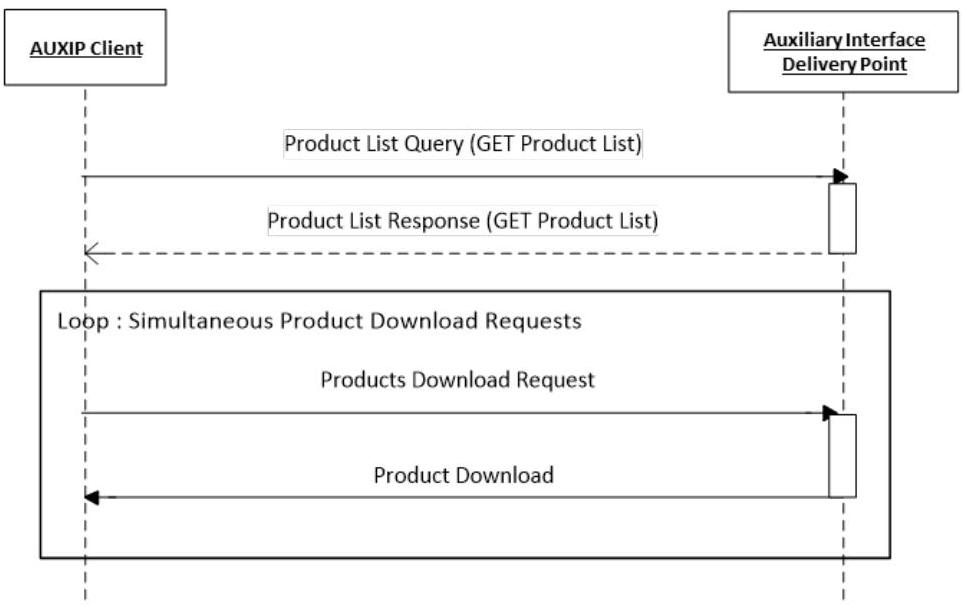
Figure 1: Nominal Product Retrieval Scenario from the Auxiliary Interface Delivery Point
In the first step, an AUXIP client uses the API to request a list of products currently available for download from the AUXIP by sending a GET Products List Query. As AUXIP clients are in general systematic downloaders of Sentinel Auxiliary data products, these requests are sent regularly to ensure that a complete picture of all relevant published products is maintained at client-level. The query can include a filter by the content of the product name, and by publication time. Time range filtering examples include:
○ All products published after a certain date-time. Likely to be used for more regular requests, to discover the products published in the time interval since the previous request.
All products published in a certain date-time range (start/stop). For example, a client that prioritizes download of latest data uses date-time ranges to download.
All products (no time range).
In response, the AUXIP uses the GET Products List Response to provide the user with the requested list of products. For each product on the list, a limited set of product property metadata is provided. These metadata are intended to give the client a partial picture of each product to assist in retrieval. Fields will include: Product ID (logical file identifier), Product Name, Content Length (size of the downloadable file), Publication (Creation) Date, Eviction Date (time period for which data will remain on AUXIP before deletion), Checksums (algorithm, value and date) and Content Date (product start and end times).
Following receipt of the GET Products List Response, the AUXIP user can optionally check if any of the products reported in the list have already been retrieved, based on the user’s own local inventory. Then, Product Download Requests are sent to the AUXIP via the API for the required products. Products will be downloaded in the pre-defined packages for the product type.
Requests are limited by a quota mechanism, e.g. limiting the user a maximum number of connections in parallel.
3.2 Product Entity Model¶
The figure below shows the AUXIP basic Product Entity model.
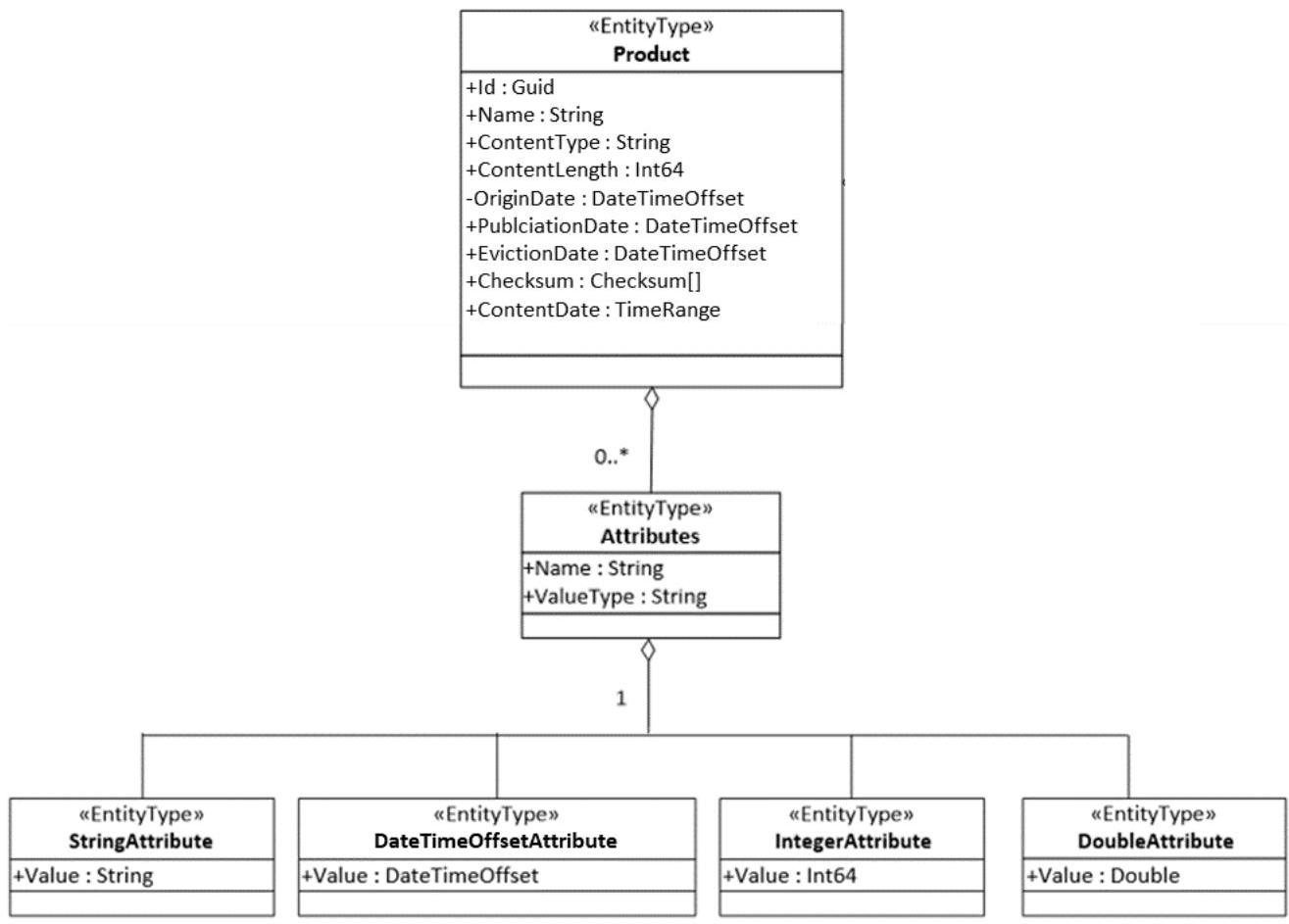
Figure 2: Product Entity Model
| Product Properties | Type | M | Description | Example |
|---|---|---|---|---|
| Id | Guid1 | Y | It is a universally unique identifier (UUID). The Id is a local identifier for the product instance within the AUXIP, assigned by the service managing the AUXIP. | 2b17b57d-fff4-4645- b539-91f305c27c69 |
| Name | String | Y | Data file name | S2__OPER_AUX_ECMWFD_ PDMC_20190216T120000 _V20190217T090000_20 190217T210000.TGZ |
| ContentType | String | Y | The Mime type of the product | application/octet- stream |
| ContentLength | Int64 | Y | Actual size in bytes (B) of the downloadable file | 8326253 |
| OriginDate2 | DateTimeO ffset | N | Date and time of the product availability at the source. Time is in UTC in the format YYYY-MM-DDThh:mm:ss.sssZ | 2018-01- 17T12:56:05.232Z |
| PublicationDate | DateTimeO ffset | Y | Publication date and time of the data file (time at which the file becomes visible to the user). Time is in UTC in the format YYYY- MM-DDThh:mm:ss.sssZ | 2019-02- 16T12:00:00.000Z |
| EvictionDate | DateTimeO ffset | N | Date when the data file will be removed from the rolling repository. Time is in UTC in the format YYYY-MM- DDThh:mm:ss.sssZ The EvictionDate is optional but should be provided if a rolling policy is in place. | 2019-02- 23T12:00:00.000Z |
| Checksum (Algorithm, Value and ChecksumDate) | Checksum[ ] | Y | Represents the known checksums for the product's physical date, providing a unique value for supporting download integrity check. At least MD5 checksum, including ChecksumDate, is mandatory. | "Checksum": [ { "Algorithm":"MD5", "Value":"E8A303BF3D8 5200 514F727DB60E7DB65" "ChecksumDate":"2019 -02- 16T12:00:00.000Z" } ] |
| ContentDate | TimeRange | Y | The validity date range period. Start and end dates are in UTC in the format YYYY-MM- DDThh:mm:ss.sssZ | "ContentDate": { "Start":"2019-02- 17T09:00:00.000Z", "End":"2019-02- 17T21:00:00.000Z" } |
Table 1: Product Properties in GET Products List Response
| Attribute Properties | Type | M | Description | Example |
|---|---|---|---|---|
| Name | String | Y | String name of the attribute | platformShortName |
| ValueType | String | Y | The type of attribute. This shall correspond to the following3: - String - Integer - DateTimeOffset - Double | String |
| Value | Depends on ValueType | Y | The value of the attribute, depending on the ValueType | SENTINEL-2 |
Table 2: Attributes Entity Description
As Attribute values will require different data types, they are based on derived entity types such as StringAttribute, DateTimeOffsetAttribute, IntegerAttribute etc (see Figure 2).
For the full list of applicable attributes, refer to [AD-1], [AD-2], [AD-3], [AD-4] and [AD-5]. Note that in the case of the AUXIP, the set of attributes necessary to be queryable will be outlined in the Compliance Tests (to be specified in Appendix B), although all Attributes should be reported through the interface.
The response to an $expand=Attributes query shall include at least the attribute properties listed in Table 2.
¹ For this, and for all other instances of the use of ‘Guid’ for IDs in this document, it should be noted that the IDs are UUIDs (Universally Unique Identifiers) of the (OData) Guid type.
² Relevant only for the ADG AUXIP and may not be applicable to all AUX product types. It is only useful as information for systematic processing.
3.3 Query Products Catalogue¶
The Query Products Catalogue function is achieved through standard APIs according to the Entity Model described in Section 3.2. By default, the Products query are to be ordered by Publication Date, in an ascending order (e.g. any query for new products published since a previous query will find the list ordered from oldest to newest)
3.3.1 Query Products¶
The main query possibilities are outlined below, filter conditions may be combined.
3.3.1.1 Query by Name¶
The most basic way to query products within the AUXIP is to perform queries based on the filename, using string functions.
| Function | Description |
|---|---|
| contains | The contains function returns records with names containing a particular string at any position |
| endswith | The endswith function returns true if the first parameter string value ends with the second parameter string value, otherwise it returns false |
| startswith | The startswith function returns true if the first parameter string value starts with the second parameter string value, otherwise it returns false |
The list of products starting with the filename “S1A_AUX_” can be retrieved as follows:
https://<service-root-uri>/odata/v1/Products?$filter=startswith(Name,'S1A_AUX_')
The following query will return all products containing “S2_OPER_AUX_UT1UTC”:
https://<service-root-uri>/odata/v1/Products?$filter=contains(Name,'S2_OPER_AUX_UT1UTC')
³ Only these values shall be allowed (e.g. Edm.DateTimeOffset or DateTimeOffsetAttribute is not allowed)
3.3.1.2 Query by Product Publication Date¶
The list of products published in the AUXIP since a reference time:
https://<service-root-uri>/odata/v1/Products?$filter=PublicationDate gt 2020-05-15T00:00:00.000Z
3.3.1.3 Query by Validity Date¶
The list of products filtered by validity date criteria can be retrieved for example as follows:
https://<service-root-uri>/odata/v1/Products?$filter=ContentDate/Start gt 2019-05-15T00:00:00.000Z and ContentDate/End lt 2019-05-16T00:00:00.000Z
3.3.1.4 Query by Attributes¶
[AD-1], [AD-2], [AD-3], [AD-4] and [AD-5] provide the definition of the minimum metadata that shall be indexed for each product, and their origin within the product.
The list of products associated with a particular attribute Name value can be obtained as follows:
https://<service-root-uri>/odata/v1/Products?$filter=Attributes/OData.CSC.ValueTypeAttribute/any(att:att/Name eq '[Attribute.Name]' and att/OData.CSC.ValueTypeAttribute/Value eq '[Attribute.Value]')
Where the ValueTypeAttribute is the defined type for the Named attribute, e.g. StringAttribute, DateTimeOffsetAttribute, IntegerAttribute.
Products can also be queried by using a combination of attributes as in the example below:
https://<service-root-uri>/odata/v1/Products?$filter=Attributes/OData.CSC.StringAttribute/any(att:att/Name eq 'productType' and att/OData.CSC.StringAttribute/Value eq 'AUX_ECMWFD') and Attributes/OData.CSC.StringAttribute/any(att:att/Name eq 'platformShortName' and att/OData.CSC.StringAttribute/Value eq 'SENTINEL-2')
3.3.1.5 Additional Options¶
Query functions shall be supported on all properties of the Product according to the OData $filter query option. Results ordering shall be supported according to the $orderby option; result paging shall be supported according to the $top, $skip and $count options, with the page size configurable to support at least 1000 returned results per page.
Additionally, the (OD)PRIP shall support the “and”, “or”, “not” and “in” operators. More details on these options are provided below.
$orderby
The $orderby system query option allows clients to request resources in either ascending order using ‘asc’ or descending order using ‘desc’. If ‘asc’ or ‘desc’ not specified, then the resources will be ordered in ascending order.
For example:
https://<service-root-uri>/odata/v1/Products?$orderby=PublicationDate desc
Will return a list of products ordered by PublicationDate in descending order.
$top
The $top system query option allows clients to specify the maximum (non-negative integer) number of items returned from a query. In the case of the AUXIP, $stop shall accept a maximum value of at least 1000.
For example:
https://<service-root-uri>/odata/v1/Products$top=1000&$filter=startswith(Name,'S2')
Will return the first 1000 Sentinel-2 Auxiliary products currently available on the AUXIP.
$skip
The $skip system query option allows clients to specify a (non-negative integer) number of items excluded from the start of a query result, i.e. the query will start returning items from the provided integer+1.
For example:
https://<service-root-uri>/odata/v1/Products$skip=100&$filter=startswith(Name,'S2')
Will return the all Sentinel-2 Auxiliary products currently available on the AUXIP, excluding the first 100.
$top and $skip are often applied together; in this case $skip is always applied first regardless of the order in which they appear in the query.
$count
The $count system query option allows clients to request a count of the matching resources included with the resources in the response: the number of the matching resources is returned as result.
The $count query option is useful to know the number of entities which are identified by the resource path section of the URI after having applied some filters.
For example:
https://<service-root-uri>/odata/v1/Products$count=true&$filter=startswith(Name,'S2')
Will return the number of Sentinel-2 products currently available on the AUXIP.
Operators "and", "or", "not", "in"
The “and” operator allows clients to combine different filter functions.
Example:
https://<service-root-uri>/odata/v1/Products?$filter=startswith(Name,'S1') and endswith(Name,'.EOF.zip')
The “or” operator allows clients to apply different filter values on the same filter function. The “or” operator shall not be used on different functions.
Example:
https://<service-root-uri>/odata/v1/Products?$filter=contains(Name,'AMH_ERRMAT') or contains(Name,'AMV_ERRMAT')
The “not” operator allows clients to omit certain results from the query.
Example:
https://<service-root-uri>/odata/v1/Products?$filter=startswith(Name,'S1') and not contains(Name,'AUX_CAL')
The “in” operator allows for a shorthand way of writing multiple “eq” expressions joined by “or”.
Example:
https://<service-root-uri>/odata/v1/Products?$filter=Attributes/OData.CSC.StringAttribute/any(att:att/Name eq 'productType' and att/OData.CSC.StringAttribute/Value in ('AUX_WAV', 'AUX_ICE', 'AUX_WND'))
3.3.2 Query Products Response¶
The GET Products List response is an HTTP response to the GET product request. As recommended by the OData specification, the AUXIP OData service should support responses in JSON.
HTTP Response Envelope
The following overall HTTP status codes may be returned with the response:
200 OK: if the request is accepted and a response can be returned
400 Bad Request
401 Unauthorized: if the requesting client is unauthorised
404 Not Found
429 Too Many Requests: if a quota is exceeded (see section 4.1.2)
500 Internal Server Error
In the case where the query is accepted but no products are found (for example if nothing is found in the date range of the query) then the 200 OK code is returned with an empty response body, instead of returning the 404 Not Found code.
Products Properties
For each product element in the Products List, the set of properties provided is listed in Table 1 above.
It is assumed that at the time of response, all products returned in a Request Products List Response are currently available online at the AUXIP, i.e. EvictionDates will always be in the future.
Example (JSON format):
HTTP/1.1 200 OK
{
"@odata.context": "$metadata#Products",
"value": [
{
"@odata.context": "$metadata#Products",
"@odata.mediaContentType": "application/octet-stream",
"Id": "e872683a-ea5b-455d-bfb2-fb304cbfbacb",
"Name": "S2_OPER_AUX_ECMWFD_PDMC_20190216T120000_V20190217T090000_20190217T210000.TGZ",
"ContentType": "application/octet-stream",
"ContentLength": 8326253,
"PublicationDate": "2019-02-16T12:00:00.000Z",
"EvictionDate": "2019-02-23T12:00:00.000Z",
"Checksum"
[
{
"Algorithm": "MD5",
"Value": "E8A303BF3D85200514F727DB60E7DB65",
"ChecksumDate": "2019-02-16T12:00:00.000Z"
}
]
"ContentDate": {
"Start": "2019-02-17T09:00:00.000Z",
"End": "2019-02-17T21:00:00.000Z"
}
}
]
}
3.3.3 Catalogue Export¶
Catalogue data may be exported from the AUXIP in a compact format for cross-reference with other GS elements. The elements included in the catalogue export are the product properties and attribute properties, and shall be presented in JSON format corresponding to the query:
Products?$expand=Attributes&$format=json
Recognising that this may be a resource consuming query it may be preferred to cache such results in sorted lists of JSON files as routinely updated snapshots e.g. per validity date or per publication date., whereby exported files are organized in folders according to the following hierarchical structure:
[SSS]: Satellite Platform short name, 3 characters (e.g. S1_, S1A, S2A, …)
[YYYY]: Validity Year, 4 digits (e.g. 2014, 2015, …)
[MM]: Validity Month, 2 digits (e.g. 01, 02, …)
The month folder contains the set of exported files. There is a data file for each day of the month. Each data file lists the products having the same ‘validity start’ date.
The exported file naming convention and format is:
<sss>_<yyymmdd>_<aux>_<xyz>_catalogue_<yyymmddhhmmss>.json
where:
<SSS> 3 characters corresponding to the satellite platform short name S1_, S1A, S1B, S2A etc.
<YYYYMMDD> 8 digits corresponding to the validity start date of all the products listed in the file
<aux>_<xyz> 7 characters corresponding to the Auxiliary system, where XYZ represents the AUX provider:
ADG = Aux Data Gathering
POD = Precise Orbit Determination
C-V = Cal/Val⁴
<yyyymmddhhmmss> 14 digits corresponding to the year, month, day and UTC time of the catalogue snapshot. The products listed in the exported file are those that have been published in the AUXIP up until this date.
The frequency of the snapshot should be e.g. nightly.
These lists shall be made available through a simple HTTPS file interface, and accessible by the clients with the same credentials as for the AUXIP. The lists shall be maintained from the start of AUXIP operations, i.e. maintaining the record even when the data are removed from the AUXIP due to the rolling period.
3.4 Product Download¶
Product download over the OData API is initiated using the ‘Id’ for each product returned in the GET Products List Response. The correct URI for the download of a single product is:
https://<service-root-uri>/odata/v1/Products(Id)/$value
Where Id is the UUID assigned per product.
The download is considered in the OData protocol through the /$value URL ([RD-2] §11.2.3 “To address the media stream represented by a media entity, clients append /$value to the resource path of the media entity URL. Services may redirect from this canonical URL to the source URL of the media stream.”.
The AUXIP response supports the following HTTP status codes as a minimum:
200 OK
307 Temporary Redirect (if applicable)
400 Bad Request
404 Product not found or no longer available
401 Unauthorized
429 Too Many Requests: if the download quota is exceeded (see section 4.1.2)
500 Internal Server Error
The AUXIP supports single unit downloads only. No component downloads of, for example, metadata, are assumed. However, http byte range requests on full product downloads are allowed, enabling pause/resume of
downloads or the efficient split of large download into multiple chunks, and may be added as a Range Header to the Download Request, eg: “Range: bytes=0-1023”
⁴ In the context of the CSC GS Cal/Val can also be referred to as Mission Performance Cluster (MPC)
3.5 Subscription¶
The Subscription function allows the request for automated notifications of new products entering the AUXIP, according to a set of filter parameters supplied within the subscription request. Once the notification has been received, the client can request the download of the product.
The sequence diagram below illustrates the subscription process.
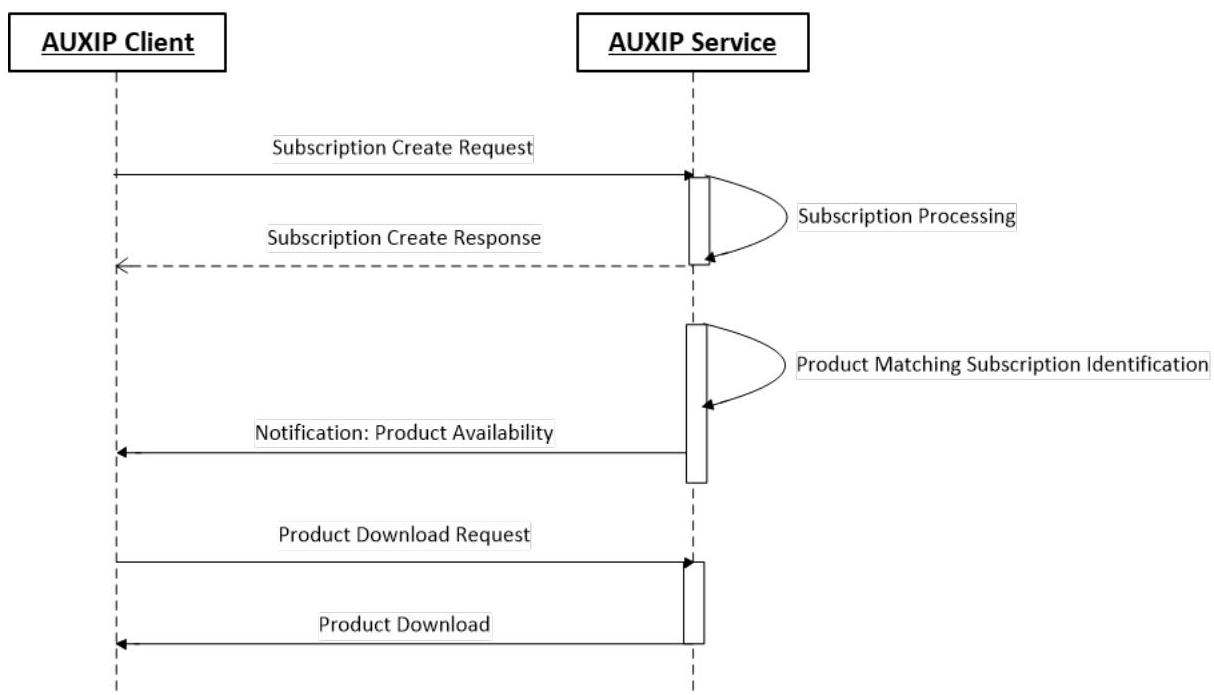
Figure 3: Subscription Nominal Sequence
The nominal scenario can be described in the following steps:
STEP 1 – Subscription Create
The scenario is initiated by an AUXIP client submitting a create subscription request to the AUXIP service. The request contains the filter parameters of the subscription (product types, time range, etc.) and a NotificationEndpoint to which product download notifications will be sent. The request is processed by the AUXIP service, and a response is returned, which includes a unique identifier for the particular subscription request, a status (initially running), the filter parameters and the submission date/time of the request.
STEP 2 – Product Notification and Product Retrieval
For each subscription with status running, the AUXIP identifies new products matching the provided filter criteria. Upon identification, the AUXIP sends a notification of product availability to the
NotificationEndpoint provided, containing the product ID, name, the subscription ID and the notification date. The client is then free to submit a product Download Request to trigger the download of the product (see section 3.4).
A subscription continues to identify products matching the filter parameters until it is paused or cancelled.
In case the client endpoint is unavailable and the subscription notification fails, there is no retry.
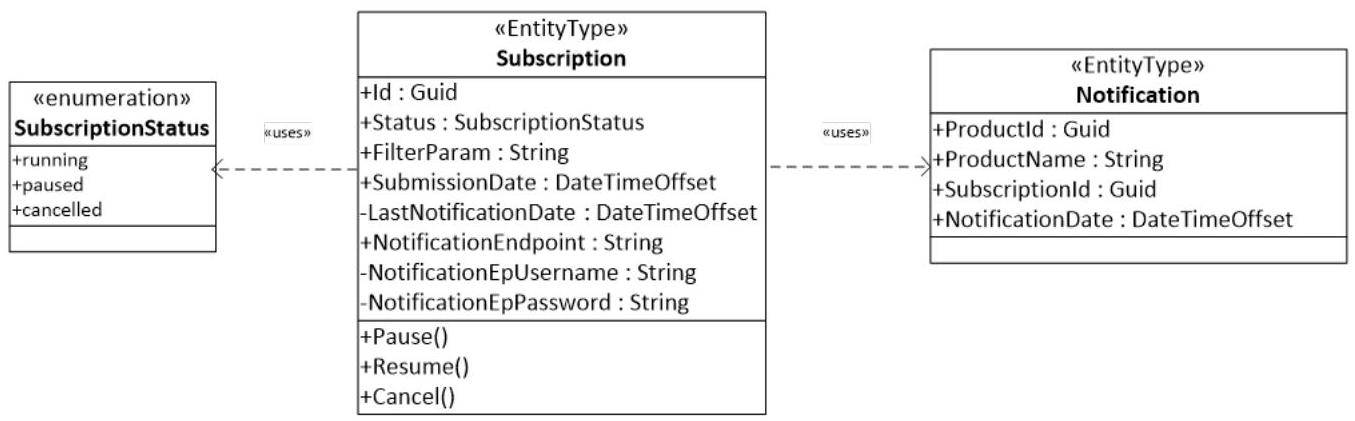
Figure 4: Subscription Model
| Subscription Properties | Type | M | Description | Example |
| Id | Guid | Y | The Id is a local unique identifier for the Subscription instance within the AUXIP, assigned upon Subscription creation. | 2b17b57d-fff4-4645-b539- 91f305c27e11 |
| Status | Subscriptio nStatus enumeratio n | Y | SubscriptionStatus value: - running - paused - cancelled | running |
| FilterParam | String | Y | The filter parameters of the Subscription (refers to the $filter= parameter of any Products? query) | contains(Name,'_AUX_ECMWFD_' ) and PublicationDate gt 2019- 02- 01T00:00:00.000Z and PublicationDate lt 2019-09- 01T00:00:00.000Z |
| SubmissionDate | DateTime Offset | Y | Date and time at which the Subscription was received by the AUXIP. Time is in UTC in the format YYYY-MM- DDThh:mm:ss.sssZ | 2019-01-17T14:46:03.788Z |
| LastNotification Date | DateTime Offset | N | Date and time corresponding to the last time the Subscription was notified. Time is in UTC in the format YYYY-MM- DDThh:mm:ss.sssZ | 2019-02-05T09:00:00.000Z |
| Only provided following the initial Subscription query. | ||||
| NotificationEndp oint | String | Y | URI used by the AUXIP for subscription notifications | Any URI, e.g. https://myservice/notification |
| NotificationEpUs ername | String | N | The username associated with the EndPoint URI provided Mandatory if NotificationEndpoint requires authentication | myserviceuser |
| NotificationEpPa ssword | String | N | The password associated with the EndPoint URI provided Mandatory if NotificationEndpoint requires authentication Shall be suitably secured to not be disclosed in subsequent queries via the OData interfaces. | *********** |
Table 3: Subscription Entity Description
| Notification Properties | Type | M | Description | Example |
|---|---|---|---|---|
| ProductId | Guid | Y | The unique identifier of the product being notified. Maps to Product.Id | 2b17b57d-fff4-4645-b539- 91f305c27c69 |
| ProductName | String | Y | The data file name of the product being notified. Maps to Product.Name | S2__OPER_AUX_ECMWFD_PDMC_2019021 6T120000_V20190217T090000_201902 17T210000.TGZ |
| SubscriptionId | Guid | Y | The identifier of the Subscription being notified. Maps to Subscription.Id | 2b17b57d-fff4-4645-b539- 91f305c27e11 |
| NotifictionDate | DateTime Offset | Y | Date and time at which the notification was generated. Time is in UTC in the format YYYY- MM-DDThh:mm:ss.sssZ | 2019-02-05T09:00:00.000Z |
Table 4: Subscription Notification Entity Description
i-i Subscription Create: Example Request:
POST


http://<service-root-uri>/odata/v1/Subscriptions
{
"@odata.context": "$metadata#Subscription/$entity",
"FilterParam": "contains(Name,'_AUX_ECMWFD_') and PublicationDate gt 2019-02-01T00:00:00.000Z and PublicationDate lt 2019-09-01T00:00:00.000Z",
"NotificationEndpoint": "https://myservice/notification",
"NotificationEpUsername": "myserviceuser",
"NotificationEpPassword": "***"
}
i-ii Subscription Create: Example Response (JSON format):
HTTP/1.1 201 Created
{
"@odata.context": "$metadata#OData.CSC.Subscription",
"Id": "2b17b57d-fff4-4645-b539-91f305c27e11",
"Status": "running",
"FilterParam": "contains(Name,'_AUX_ECMWFD_') and PublicationDate gt 2019-02-01T00:00:00.000Z and PublicationDate lt 2019-09-01T00:00:00.000Z",
"SubmissionDate": "2019-01-27T18:25:30.000Z",
"NotificationEndpoint": "https://myservice/notification"
}
ii-i Example Subscription Notification:
POST
http://myservice/notification
{
"@odata.context": "$metadata#Notification/$entity",
"ProductId": "e872683a-ea5b-455d-bfb2-fb304cbfbacb",
"ProductName": "
S2_OPER_AUX_ECMWFD_PDMC_20190216T120000_V20190217T090000_20190217T210000.TGZ",
"SubscriptionId": "2b17b57d-fff4-4645-b539-91f305c27e11",
"NotificationDate": "2019-02-16T12:18:09.000Z"
}
4 CLIENT ADMINISTRATION¶
An AUXIP service enforces that only properly authenticated clients are accepted and that the access rights are applied. If a client calls an AUXIP service function without permission, it is informed with a corresponding return message.
4.1 User5 Entity Model¶
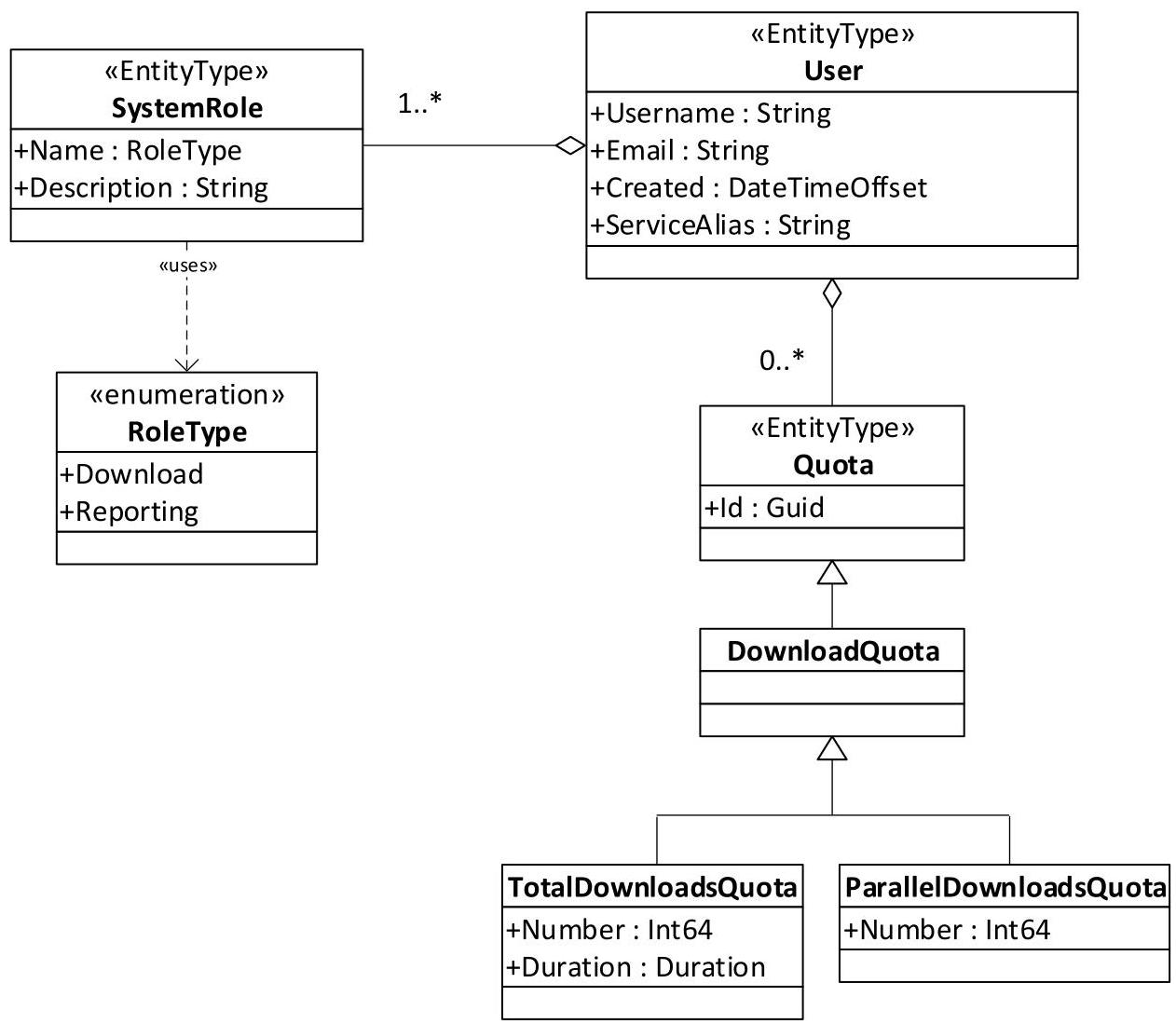
Figure 7: User Entity Model
The User entity is an entity that allows to define the system role of the client and associate any quota restrictions. The model describes the minimum properties that shall be used to control user access, according to the business agreement. The User is identified by the key property Username. The properties assigned to each User entity are described in the table below.
| User Properties | Type | M | Description | Example |
| Username (key) | String | Y | Username of the User | DataDissem4CollGSHub |
| String | Y | Email of the User | datahubops@xyz.com | |
| Created | DateTimeOffset | Y | Date/time of user creation in the AUXIP. Time is in UTC in the format YYYY- MM-DDThh:mm:ss.sssZ | 2019-02- 22T18:15:23.000Z |
| ServiceAlias | String | N | Generic string to describe the client | DataAccessColhub |
Table 5: User Entity Description
Username associated email are to be managed as generic indicators of client and not personal information.
The ServiceAlias value can be identical to the Username, unless indicated otherwise by the Agency.
The SystemRole and Quotas sub-entities, assigned for registered Users, are described in the sections below.
⁵ In this section, the User entity represents the Client
4.1.1 SystemRole¶
The SystemRole entity describes the rights and capabilities granted to a client. The properties of the SystemRole entity are described in the table below:
| SystemRole Properties | Type | M | Description | Example |
| Name (key) | RoleType enumeration | Y | Assignment of the rights and capabilities granted to a user, including: - Download - Reporting | Download |
| Description | String | Y | Textual description of the role | Allowing the user to perform queries and make downloads |
Table 6: SystemRole Entity Description
Registered clients must have one or more roles assigned. The roles available for assignment to clients may be:
Client Services
Download – The client may perform queries on the products available at the AUXIP and perform downloads
Administration Services
(Monitoring &) Reporting – Monitoring and Reporting functionality, including the permission to perform queries on all properties.
4.1.2 Quota¶
User quota is assigned on a per user basis and is applied to downloads for all users.
Download Quota (applicable to users with the ‘Download’ SystemRole)
TotalDownloadsQuota: Maximum volume (GB) transfer within a defined period
ParallelDownloadsQuota: Maximum number of separate downloads which can be performed in parallel
Should the quota be exceeded the 429 Too Many Requests code will be returned and the client must manage resubmission of the download request at a later date.
5 MONITORING AND REPORTING¶
The Monitoring and Reporting role allows for the collection of data, for analysis and reporting, of the AUXIP activity through API queries on all Products and Subscriptions managed by the system. When used for the reporting function the API allows the collection of data concerning the overall use of the system by registered users; used for the monitoring function the API allows to regularly collect information concerning indicators which may be used to assess whether the routine operation of the system is running within the expected bounds.
The parameters obtained for Monitoring and Reporting through the API, with example requests, are detailed in the sections below.
5.1.1 Reporting¶
The table below provides a possible schema for routine collection of reporting information, example queries are developed further. The time period is indicative, depending on the strategy for end-to-end monitoring and reporting.
| System Entity | Reporting Statistic | Time Period | Entity Parameters Collected |
|---|---|---|---|
| Products | Products published | 10 minutes | - Count - Name - ContentLength (Product size) - OriginDate6 - PublicationDate - ContentDate/Start |
| Subscriptions | Subscription in status running (total) | 10 minutes | - Count |
| Subscriptions submitted (daily) | 10 minutes | - Count - Username - Id (Subscription) |
Table 7: AUXIP Reporting Statistics
Examples of the queries used to retrieve the described statistics are presented below. Descriptions are limited to a single entity and can straightforwardly be modified to the other entities reported on where necessary.
i Products published per day
The $count notation is used to return the total products published in a particular day, and the $select notation to select the product properties to be returned.
i-i Request
https://<service-root-uri>/odata/v1/Products?$count=true&$filter=PublicationDate gt 2019-01-17T00:00:00.000Z and PublicationDate lt 2019-01-18T00:00:00.000Z&$select=Name,ContentLength,PublicationDate,ContentDate/Start
i-ii Response (JSON format)
In the example, the count of products returned has been limited to two.
HTTP/1.1 200 OK
{

"@odata.context":  "$metadata#Products",

"count":  "2":
"value":
[

{

"@odata.mediaContentType":  "application/octet-stream",

"Name":
"S2_OPER_AUX_ECMWFD_PDMC_20190216T120000_V20190217T090000_20190217T210000.TGZ",

"ContentType":  "application/octet-stream",

"ContentLength":  8326253,

"PublicationDate":  "2019-02-17T12:00:00.000Z",

"ContentDate":
{

"Start":  "2019-02-17T09:00:00.000Z"

      }

    }
{

"@odata.mediaContentType":  "application/octet-stream",

"Name":  "S1_AUX_WND_V20190117T120000_G20190117T063216.SAFE.zip",

"ContentType":  "application/octet-stream",

"ContentLength":  12456234,

"PublicationDate":  "2019-01-17T10:25:00.066Z",

"ContentDate":
{

"Start":  "2019-01-17T12:00:00.000Z"

      }

    }

  ]
}
Download Reporting
Due to the flexibility inherent with the download via byte ranges the download reporting may be managed through the summary reporting outlined below.
⁶ This may only be relevant to the ADG AUXIP
5.1.2 Auxiliary Data Delivery Interface Points Metrics¶
The high-level statistics listed below are typical of those which will be made available by the AUXIP Systems towards a dashboard, for example, summarizing the current status of the system and its operations. Since such statistics would be relatively intensive to calculate on-demand it is assumed that they will be pre-calculated on a routine basis (e.g. daily, hourly, every 10 minutes) and cached, rather than dynamically retrieved via standard API queries. The following OData Metrics Entity provides the metrics at a reporting frequency outlined in Table 8.
| Metrics Property | Type | Description |
|---|---|---|
| Name | String | Name of metric according to a standard naming convention |
| Timestamp | DateTimeOffset | Date/time of metric reporting. Time is in UTC in the format YYYY-MM-DDThh:mm:ss.sssZ |
| MetricType | Enum | Gauge or Counter |
| Gauge | String | Value of Gauge at reporting timestamp (mandatory if MetricType=Gauge) |
| Count | Int64 | Value of Counter at reporting timestamp (mandatory if MetricType=Counter) |
| Metric 7 | Description | Type | Frequency |
|---|---|---|---|
| <productType>.<platformShortName>.<platformSerialIdentifier>.size | Cumulative volume of <productType> of mission platform (<platformShortName>.<platformSerialIdentifier>) published in the AUXIP in Bytes | Counter | Hourly update |
| <productType>.<platformShortName>.<platformSerialIdentifier>.count | Cumulative number of <productType> of mission platform (<platformShortName>.<platformSerialIdentifier>) published in the AUXIP | Counter | Hourly update |
| <platformShortName>.<platformSerialIdentifier>.size | Cumulative volume of data published in the AUXIP for mission platform (<platformShortName>.<platformSerialIdentifier>) in Bytes | Counter | Hourly update |
| Download.<productType>.<platformShortName>.<platformSerialIdentifier>.<ServiceAlias>.size | Cumulative size of <productType of mission platform (<platformShortName>.<platformSerialIdentifier>) downloaded (by <ServiceAlias>) in Bytes | Counter | Hourly update |
| Download.<productType>.<platformShortName>.<platformSerialIdentifier>.<ServiceAlias>.completed | Cumulative number of <productType> downloads of mission platform (<platformShortName>.<platformSerialIdentifier>) completed (by <ServiceAlias>) | Counter | Hourly update |
| Download.<productType>.<platformShortName>.<platformSerialIdentifier>.<ServiceAlias>.failed | Cumulative number of <productType> downloads of mission platform (<platformShortName>.<platformSerialIdentifier>) failed (by <ServiceAlias>) | Counter | Hourly update |
| 8 OriginToPublication.Daily.min.time.<productType>.<platformShortName><platformSerialIdentifier> | Daily minimum time difference in seconds between OriginDate at the source and AUXIP PublicationDate of <productType> of mission <platformShortName>.<platformSerialIdentifier> (sliding window of 24 hours) | Gauge | Hourly update |
| OriginToPublication.Daily.max.time.<productType>.<platformShortName><platformSerialIdentifier> | Daily maximum time difference in seconds between OriginDate at the source and AUXIP PublicationDate of <productType> of mission <platformShortName>.<platformSerialIdentifier> (sliding window of 24 hours) | Gauge | Hourly update |
| OriginToPublication.Daily.avg.time.<productType>.<platformShortName><platformSerialIdentifier> | Daily average time difference in seconds between OriginDate at the source and AUXIP PublicationDate of <productType> of mission <platformShortName>.<platformSerialIdentifier> (sliding window of 24 hours) | Gauge | Hourly update |
| OriginToPublication.Monthly.min.time.<productType>.<platformShortName><platformSerialIdentifier> | Monthly minimum time difference in seconds between OriginDate at the source and AUXIP PublicationDate of <productType> of mission <platformShortName>.<platformSerialIdentifier> (sliding window of last month) | Gauge | Hourly update |
| OriginToPublication.Monthly.max.time.<productType>.<platformShortName><platformSerialIdentifier> | Monthly maximum time difference in seconds between OriginDate at the source and AUXIP PublicationDate of <productType> of mission <platformShortName>.<platformSerialIdentifier> (sliding window of last month) | Gauge | Hourly update |
| OriginToPublication.Monthly.avg.time.<productType>.<platformShortName><platformSerialIdentifier> | Monthly average time difference in seconds between OriginDate at the source and AUXIP PublicationDate of <productType> of mission <platformShortName>.<platformSerialIdentifier> (sliding window of last month) | Gauge | Hourly update |
| Service.<KPI>.value | KPI value | Gauge |
Table 8: AUX Service Summary Reporting Statistics
⁷ Note that for Auxiliary files that can apply to an entire Sentinel mission constellation (e.g. Sentinel-1), an underscore shall be used for the <platformSerialIdentifier>
⁸ All OriginToPublication metrics are not applicable to reprocessing services
APPENDIX A ODATA METADATA DESCRIPTION¶
<?xml version="1.0"?>
<edmx:Edmx Version="4.0">
  <edmx:DataServices>
    <Schema Namespace="OData.CSC">
      <EnumType Name="SubscriptionEvent" IsFlags="false" UnderlyingType="Edm.Int32">
        <Member Name="created" Value="0"/>
        <Member Name="deleted" Value="1"/>
      </EnumType>
      <EnumType Name="SubscriptionStatus" IsFlags="false" UnderlyingType="Edm.Int32">
        <Member Name="running" Value="0"/>
        <Member Name="paused" Value="1"/>
        <Member Name="cancelled" Value="2"/>
      </EnumType>
      <EnumType Name="EnumType" IsFlags="false" UnderlyingType="Edm.Int32">
        <Member Name="Gauge" Value="0"/>
        <Member Name="Counter" Value="1"/>
      </EnumType>
      <EntityType Name="StringAttribute" BaseType="OData.CSC.Attribute">
        <Property Name="Value" Type="Edm.String"/>
      </EntityType>
      <EntityType Name="IntegerAttribute" BaseType="OData.CSC.Attribute">
        <Property Name="Value" Type="Edm.Int64"/>
      </EntityType>
      <EntityType Name="DateTimeOffsetAttribute" BaseType="OData.CSC.Attribute">
        <Property Name="Value" Type="Edm.DateTimeOffset"/>
      </EntityType>
      <EntityType Name="DoubleAttribute" BaseType="OData.CSC.Attribute">
        <Property Name="Value" Type="Edm.Double"/>
      </EntityType>
      <EntityType Name="Subscription">
        <Key>
          <PropertyRef Name="Id"/>
        </Key>
        <Property Name="Id" Type="Edm.Guid"/>
        <Property Name="Status" Type="OData.CSC.SubscriptionStatus"/>
        <Property Name="SubscriptionEvent" Type="OData.CSC.SubscriptionEvent"/>
        <Property Name="FilterParam" Type="Edm.String"/>
        <Property Name="SubmissionDate" Type="Edm.DateTimeOffset" Precision="3"/>
        <Property Name="LastNotificationDate" Type="Edm.DateTimeOffset" Precision="3"/>
      </EntityType>
      <EntityType Name="Product" HasStream="true">
        <Key>
          <PropertyRef Name="Id"/>
        </Key>
        <Property Name="Id" Type="Edm.Guid"/>
        <Property Name="Name" Type="Edm.String"/>
        <Property Name="ContentType" Type="Edm.String"/>
        <Property Name="ContentLength" Type="Edm.Int64"/>
        <Property Name="OriginDate" Type="Edm.DateTimeOffset" Precision="3"/>
        <Property Name="PublicationDate" Type="Edm.DateTimeOffset" Precision="3"/>
        <Property Name="EvictionDate" Type="Edm.DateTimeOffset" Precision="3"/>
        <Property Name="Checksum" Type="Collection(OData.CSC.Checksum)"/>
        <Property Name="ContentDate" Type="OData.CSC.TimeRange"/>
        <NavigationProperty Name="Attributes" Type="Collection(OData.CSC.Attribute)"/>
      </EntityType>
      <EntityType Name="Attribute" Abstract="true">
        <Key>
          <PropertyRef Name="Name"/>
        </Key>
        <Property Name="Name" Type="Edm.String"/>
        <Property Name="ValueType" Type="Edm.String"/>
      </EntityType>
      <EntityType Name="Metric">
        <Key>
          <PropertyRef Name="Name"/>
        </Key>
        <Property Name="Name" Type="Edm.String"/>
        <Property Name="Timestamp" Type="Edm.DateTimeOffset" Precision="3"/>
        <Property Name="MetricType" Type="OData.CSC.EnumType"/>
        <Property Name="Gauge" Type="Edm.String"/>
        <Property Name="Counter" Type="Edm.Int64"/>
      </EntityType>
      <ComplexType Name="TimeRange">
        <Property Name="Start" Type="Edm.DateTimeOffset" Nullable="false" Precision="6"/>
        <Property Name="End" Type="Edm.DateTimeOffset" Nullable="false" Precision="6"/>
      </ComplexType>
      <ComplexType Name="Checksum">
        <Property Name="Algorithm" Type="Edm.String" Nullable="false"/>
        <Property Name="Value" Type="Edm.String" Nullable="false"/>
        <Property Name="ChecksumDate" Type="Edm.DateTimeOffset"/>
      </ComplexType>
      <ComplexType Name="Property">
        <Property Name="Name" Type="Edm.String" Nullable="false"/>
        <Property Name="Value" Type="Edm.String" Nullable="false"/>
      </ComplexType>
      <Action Name="Pause" IsBound="true">
        <Parameter Name="Subscription" Type="OData.CSC.Subscription" Nullable="false"/>
        <ReturnType Type="OData.CSC.Subscription"/>
      </Action>
      <Action Name="Resume" IsBound="true">
        <Parameter Name="Subscription" Type="OData.CSC.Subscription" Nullable="false"/>
        <ReturnType Type="OData.CSC.Subscription"/>
      </Action>
      <Action Name="Cancel" IsBound="true">
        <Parameter Name="Subscription" Type="OData.CSC.Subscription" Nullable="false"/>
        <ReturnType Type="OData.CSC.Subscription"/>
      </Action>
      <EntityContainer Name="Container">
        <EntitySet Name="Products" EntityType="OData.CSC.Product">
          <NavigationPropertyBinding Path="Attributes" Target="Attributes"/>
        </EntitySet>
        <EntitySet Name="DateTimeOffsetAttributes" EntityType="OData.CSC.DateTimeOffsetAttribute" IncludeInServiceDocument="false"/>
        <EntitySet Name="Subscriptions" EntityType="OData.CSC.Subscription"/>
        <EntitySet Name="Attributes" EntityType="OData.CSC.Attribute" IncludeInServiceDocument="false"/>
        <EntitySet Name="StringAttributes" EntityType="OData.CSC.StringAttribute" IncludeInServiceDocument="false"/>
        <EntitySet Name="IntegerAttributes" EntityType="OData.CSC.IntegerAttribute" IncludeInServiceDocument="false"/>
        <EntitySet Name="DoubleAttributes" EntityType="OData.CSC.DoubleAttribute" IncludeInServiceDocument="false"/>
        <EntitySet Name="Metrics" EntityType="OData.CSC.Metric"/>
      </EntityContainer>
    </Schema>
  </edmx:DataServices>
</edmx:Edmx>
APPENDIX B INTERFACE CONFORMANCE TEST SUITE¶
A test suite that can facilitate the implementation and be used for testing the Interface delivery Point is available at https://github.com/SercoSPA/CSC-Ground-Segment-Interface-Delivery-Point-Test-Suite
The current implementation is designed to check the capability of the Interface delivery Point, and it is implemented as a Postman (https://www.getpostman.com/) Collection JSON file (format v2.1).
The test suite is provided as a set of OData requests to be sent to the Interface delivery Point, and a series of test scripts for verifying the received responses.
The test suite is quite broad and it is suitable for multiple interfaces (e.g. LTA, AUXIP, Production). It includes OData requests on: EO product types, EO product properties and attributes, as well as other main entities defined in the ICDs. The test suite may not include all possible queries specific to a certain interface. Self-tests may be performed using the Postman collection or it can be used by Clients to test existing interfaces.