1 INTRODUCTION¶
1.1 Purpose and Scope¶
The purpose of this document is to specify https RESTful Application Programming Interfaces (APIs) through which CADU data may be discovered and downloaded by authorised users following the patterns and principles defined in the other CSC GS interface delivery points. The CADU Interface delivery Points (CADIP) describes a standard pick-up point for all Sentinel CADU data collected or generated by the Acquisition Services – Ground Stations– to be interfaced by the CSC Production Services.
This specification uses the latest OData v4 standard for REST-ful APIs. The API interface is intended to be compliant with the OData v4 standard, however, it is not necessary to fully implement the OData v4 standard. Compliance to the ICD can be considered as an API contract with a set of API OData v4 style calls, which have to be supported, that shall follow OData query conventions such as URL syntax, filter syntax, content accessing conventions, etc.
1.2 Structure of the Document¶
This document is structured as follows:
Section 1 (this section): Introduction, providing document structure, reference documents and definitions/acronyms
Section 2: Provides the context of CADIPs and overview of the use cases supported
Section 3: Description of interfaces
Section 4: Client administration management
Section 5: Description of Monitoring and Reporting
Appendices: OData metadata description and API compliance test suites
1.3 Applicable Documents¶
1.4 Reference Documents¶
[RD-1] OData Documentation – OData – the Best Way to REST – v4.01 ISO standard http://www.odata.org/documentation/
[RD-2] OData Protocol http://docs.oasis-open.org/odata/odata/v4.01/odata-v4.01-part1-protocol.html
[RD-3] The OAuth 2.0 Authorization Framework – Authorization Code Grant, October 2012, Internet Engineering Task Force (IETF) https://tools.ietf.org/html/rfc6749#section-4.1
[RD-4] CSC - ESA Ground Segment Operations Framework – Architecture [ESA-EOPG-EOPGC-TN-7]
[RD-5] Copernicus Space Component Ground Segment Operations Glossary [ESA-EOPG-EOPGC-TN-13]
1.5 Definitions¶
API – Application Programming Interface – a set of routines, protocols, and tools for building software applications.
Client – any HTTP client performing HTTP/OData requests to the CADIP
DataSessionFile – Data File delivered through the CADIP, i.e. Data Session Data Block.
Quota – Refers to a restriction in the usage of the CADIP - e.g. the number of parallel downloads which a user may have ongoing at a particular time.
Use Case – is a list of actions or event steps, typically defining the interactions between an actor and a system, to achieve a goal.
For additional definitions relevant to the CSC please refer to [RD-5].
1.6 List of Acronyms¶
AD Applicable Document
API Application Programming Interface
CADU Channel Access Data Unit
CSC Copernicus Space Component
DSDB Data Session Data Block
E2E End-to-End
EO Earth Observation
ESA European Space Agency
GS Ground Segment
HTTP(S) Hypertext Transfer Protocol (Secure)
ID Identifier
ICD Interface Control Document
JSON JavaScript Object Notation
OData Open Data Protocol
RD Reference Document
REST Representational State Transfer
URI Uniform Resource Identifier
URL Uniform Resource Locator
UTC Coordinated Universal Time
UUID Universally Unique Identifier
For additional descriptions of acronyms please refer to [RD-5].
2 OVERVIEW¶
2.1 CADU Data Interface Delivery Point Description¶
The CADU Interface delivery Point (CADIP) is a pick-up point for Sentinel CADU data. The CADIP allows clients to straightforwardly discover and retrieve available data files through a standard OData RESTful API. Clients of the CADIP are intended to be downloaders whose principal use case requires systematic (or at least regular) retrieval of published CADU data. Principal clients of the CADIP will be the Systematic Production services, end-to-end Operations Performance monitoring, Reference System. The API and standard use scenario allow authorised clients to discover, with a simple set of filters, the list of files which need to be retrieved, for example since the last check, and then to perform the downloads.
The CADIP is deployed on a public cloud infrastructure. The interface between the X-band Ground Station and the data delivery point is an interface internal to the service provided by the acquisition service provider, which is therefore free to use the most suitable protocol/transfer mechanism to ensure that CADU (Data Session Data Block DSDB) files are available for download at the data delivery point.
The below information (in line with relevant applicable requirements) is reported in order to provide full transparency to the processing entity on the data transfer features and on the availability of data for download:
The DSDB files are transferred as soon as they are available and using parallel transfer as necessary.
No partial files are exposed on the data delivery point. All files are visible on the CADIP only once they have been fully transferred and can be immediately downloaded by the receiving entity.
When a file transfer is interrupted, an attempt to resume the file transfer is made, or else the partially transferred file is deleted and the transfer is restarted.
Multiple nominal sessions can be transferred in parallel as well as multiple retransfer session.
2.2 Interface Configuration¶
Only entitled clients are allowed to request Data Session Files from the CADIP. As part of every request to the CADIP, the client triggering the requests will identify themselves via Explicit identification.
The API shall support the following two methods of authentication:
HTTP Basic Authentication (not to be used operationally)
OAuth 2.0
HTTP Basic Authentication represents a simple and easy method, consisting of a client placing the username and password inside the authorization header of the request. The username and password are encoded with base64, an encoding technique that converts the username and password into a set of 64 characters in order to ensure safe transmission. It is mandatory to use Basic Authentication in conjunction with HTTPS in order to provide sufficient security to prevent unauthorized users from discovering the authentication information. HTTP Basic Authentication may be used only for the minimum compliance testing (Appendix B).
Operationally, OAuth 2.0 is to be used (https://tools.ietf.org/html/rfc6749), as it is a more secure and powerful system, allowing for scalability of security. OAuth allows access tokens and refresh tokens to be issued to clients by an authorization server. The client then uses the access token to access the interface delivery point API. The OAuth flow / grant type, to be used is the Password Credentials: https://tools.ietf.org/html/rfc6749#section-4.3.
The definition of new clients on the CADIP side is done by configuration, creating them with the necessary attributes. The attributes to be configured per client may be:
User Credentials: username and password, for authentication. Usernames and any associated attributes e.g. email are to be managed as generic indicators of client and not personal information (see section 4).
User Quota: CADIP requests are limited by a quota mechanism. Section 4.1.1 should be referred to for further details.
Users download DataSessionFiles from the CADIP using HTTP(S) protocols.
3 CADIP INTERFACE DESCRIPTION¶
This section provides detail on the specific interfaces between CADIP clients and the CADIP. Where applicable, examples of message content are provided.
3.1 Nominal Use Scenario Description¶
The nominal use scenario for discovery and download of Files from the CADIP is described below.
During the downlink of a Sentinel Acquisition the service provider publishes on the CADIP interface a record of a Session, to which will be associated a record of each File and following the completion of the acquisition session will be associated a QualityInfo record for each channel used during the acquisition.
At the beginning of the pass, the service provider publishes the fields “DownlinkStatusOK” and DeliveryPushOK" to ‘NULL’ in the Session Table.
The service provider publishes the number of channels (‘NumChannels’) detected in the downlink as a record in the Session.
The service provider transfers the CADU files to the CADIP and publishes the files that are available for download as soon as they are complete and ready to be downloaded by the client (each file associated to a channel has a sequential BlockNumber and the final file for the session is marked as FinalBlock=true, if no files are available for a channel a null record is created with BlockNumber=0 and : FinalBlock=true). Note 1:
Note 1:
Null record means that Name will not be valorised and that there is no physical file to download.
Note 2:
Block number starts with 1, if at least one file is donloaded.
Note 3:
The field FinalBlock shall be set to Null at the beginning of the Session and remain set to Null until the reception of the final file.
When the Session is complete the service provider updates the Session record with status information and publishes the QualityInfo for each channel associated to the session with no delay.
When all the DSDB files are transferred, the service provider updates the fields “DownlinkStatusOK” to inform that the transfer is completed
When all the Qualityinfo parameters have been updated and Session parameters, , the service provider updates the fields “DownlinkStatusOK’
In the event of an anomaly, the station Operators compare the data from the backup chain to that of the primary chain. The backup chain consists of a second Front-End equipment working together to provide redundancy. If the data from the backup chain is of better quality, a “retransfer” is initiated by the station operator. A ticket is created in CAMS and backup chain data is published as a new session with the property Retransfer=true on the CADIP and the same ‘SessionId’
The CADIP client routinely polls the API to discover if a new Session is available for download from the CADIP by sending a GET Session Query. The query typically would include a filter on Satellite and discover only Sessions since the last query using the Publication Time.
In response, the CADIP provides the GET Session Response to provide the user with a list of Sessions.
For each Session the CADIP client can query the number of channels available for the Session and the list of Files which are available for download for each channel. Fields will include: Id (logical file identifier), File Name, associated channel, Publication Date, Eviction Date (time period for which data will remain on CADIP before deletion.
Following receipt of the GET Files List Response, the CADIP client can download the files (in parallel). If so wished, parallel requests may be limited by a quota mechanism, e.g. limiting the user a maximum number of connections in parallel
The list of files is updated as long as the session is not complete.
In parallel, for each active session, the CADIP client continues to query the Files entity to detect the new files available from the previous query.
Once all the expected DSDB files are published, the last file of each dedicated channel will have the FinalBlock set to true, the CADIP client doesn’t need to update the file list anymore and the ingestion will end once all the files are downloaded on the client side.
If the production service notices an error in the nominal data transfer, a CAMS ticket should be opened, and a retransfer requested.
See Appendix F for other UseCases.
3.2 Entity Model¶
The figure below shows the CADIP basic Entity model.
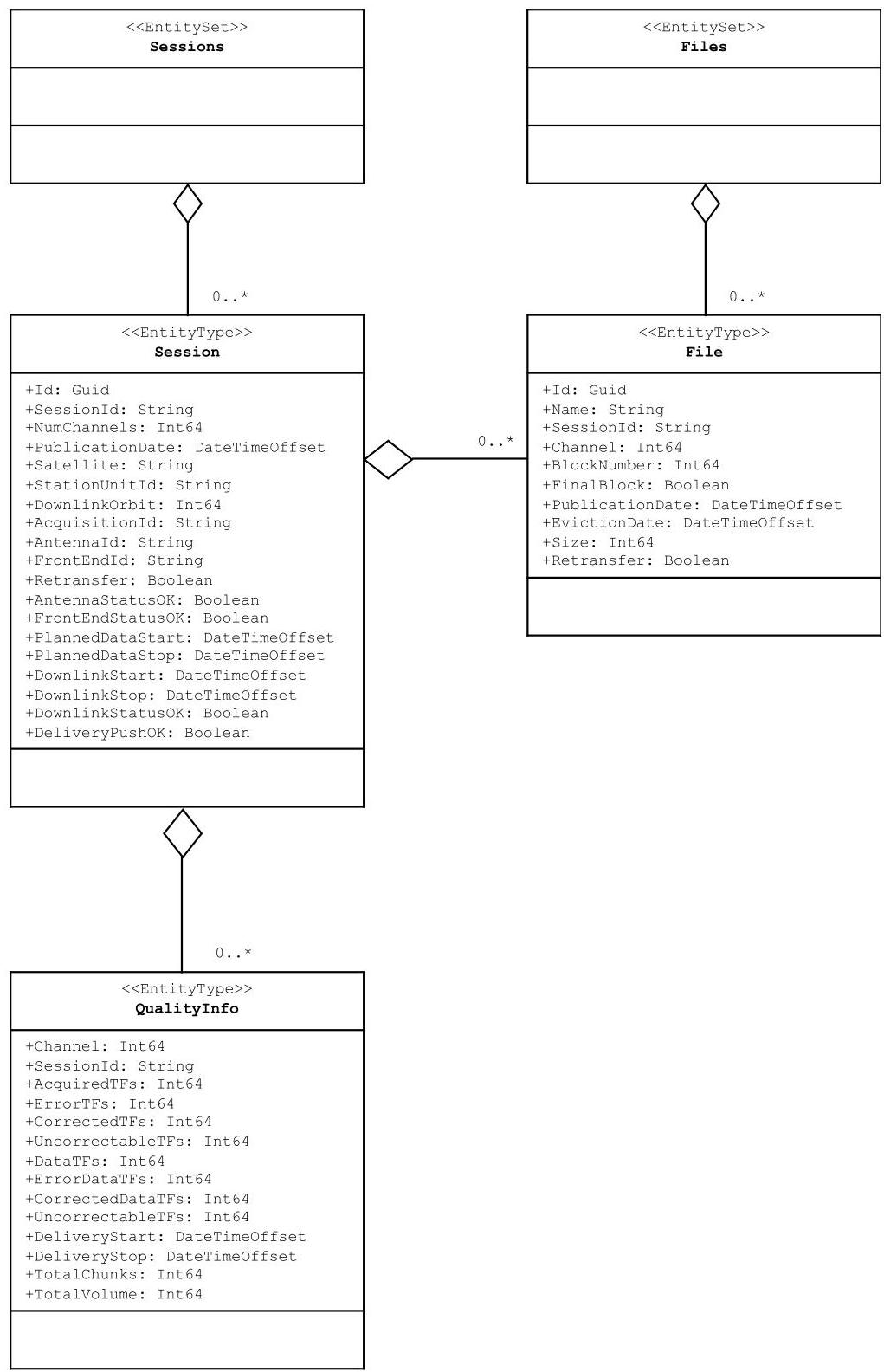
Figure 2: CADIP Entity Model
| Session Properties | Type | M | Description | Example |
|---|---|---|---|---|
| Id | Guid1 | Y | It is a universally unique identifier (UUID). The Id is a local identifier for the Session instance within the CADIP, assigned by the service managing the CADIP. | 2b17b57d-fff4- 4645-b539- 91f305c27c69 |
| SessionId | String | Y | This is the session ID, identifying each acquisition 24 characters fixed string, containing digits, defined as follows: <SSSS><YYYY><MM><DD><hh><mm ><ss><aaaaaa> Where we have: <SSSS>: satellite: - “S1A_” - “S1B_” - “S1C_” - “S1D_” - “S2A_” - “S2B_” - “S2C_” - “S2D_” - “S3A_” - “S3B_” - “S3C_” - “S3D_” - “S5P_” - “S7A_” - “S7B_” - “S7C_” <YYYY>: 4 digits year of acquisition start <MM>: 2 digits month of acquisition start <DD>: 2 digits day of acquisition start <hh>: 2 digits hour of acquisition start <mm>: 2 digits minute of acquisition start <ss>: 2 digits second of acquisition start <aaaaaa>: 6 digits acquisition orbit | S1A_2017050112 1534062343 |
| NumChannels | Int64 | Y* | This is the number of channels for the session. Allowed values are: 1 2 3 4 | 1 |
| PublicationDate | DateTime Offset | Y | Publication date (e.g. time at which the fist DSDB file becomes visible to the user). Time is in UTC in the format YYYY-MM- DDThh:mm:ss.sssZ | 2019-02- 16T12:00:00.00 0Z |
| Satellite | String | Y | 3 characters identifier for the satellite: - “S1A” for Sentinel-1A - “S1B” for Sentinel-1B - “S1C” for Sentinel-1C - “S1D” for Sentinel-1D - “S2A” for Sentinel-2A - “S2B” for Sentinel-2B - “S2C” for Sentinel-2C - “S2D” for Sentinel-2D - “S3A” for Sentinel-3A - “S3B” for Sentinel-3B - “S3C” for Sentinel-3C - “S3D” for Sentinel-3D - “S5P” for Sentinel-5p - “S7A” for CO2M 1 - “S7B” for CO2M 2 - “S7C” for CO2M 3 | S1A |
| StationUnitId | String | Y | This is the 2 digit X-band station unit ID, that can be used to identify different configurations at station level, if needed (default is 00 if only one configuration is present or the parameter is not needed) | 00 |
| DownlinkOrbit | Int64 | Y | It is the absolute downlink orbit number of the acquired pass. | 62343 |
| AcquisitionId | String | Y | Acquisition id code as from the acquisition plan Note: This information can be used by the Processing facility to correlate the status of the acquisition with the Acquisiition plan if available to the Processing facility | 415_01 |
| AntennaId | String | Y | Identification of the antenna used | (e.g. INU, SIV) |
| FrontEndId | String | Y | It is the FEP identifier Note: Frontend ID: it is the FEP identifier. Usually each Station used two acquisition chain (one nominal and one in backup). Each acquisition chain contain a FEP ID. This can be used by the station to trace which demodulator was used for a particular dump. Not relevant to the processing facility | |
| Retransfer | Boolean | Y | Flags whether the session corresponds to a retransfer | false |
| AntennaStatusO K | Boolean | Y ** | It is set to the value depending on the quality of the acquired pass at Antenna level | true |
| FrontEndStatus OK | Boolean | Y ** | It is set to the value depending on the quality of the acquired pass at Front-End processor by evaluating FER vs. admitted thresholds. | true false |
| PlannedDataStar t | DateTime Offset | Y** | Planned Date/Time start of the downlink as extracted from SAPF file | |
| PlannedDataSto p | DateTime Offset | Y** | Planned Date/Time stop of the downlink as extracted from SAPF file | |
| DownlinkStart | DateTime Offset | Y ** | Acquisition time of the first CADU in the first DSDB | 2017-05- 01T12:15:34Z |
| DownlinkStop | DateTime Offset | Y ** | Acquisition time of the last CADU in the DSDB | 2017-05- 01T12:31:57Z |
| DownlinkStatus OK | Boolean | Y ** | Overall status of downlink: “false” status shall be used if a problem has been encountered during the downlink as a warning for potential data loss or data corruption (in any case processing should be initiated since the problem may not effect science data or telemetry) | true false |
| DeliveryPushOK | Boolean | Y ** | It is set to the value depending on the evaluation of the data dissemination to the DDP “false” status shall be used if a problem has been encountered during the transfer of a DSDB file from the station to the DDP | true false |
(*) To be confirmed by the stations that this info is available at the beginning of the session
(**) Mandatory at the session completion update of the Session entity
Table 1: Properties in GET Session Response
| File Properties | Type | M | Description | Example |
|---|---|---|---|---|
| Id | Guid2 | Y | It is a universally unique identifier (UUID). The Id is a local identifier for the DSDB File instance within the CADIP, assigned by the service managing the CADIP. | 2b17b57d-fff4-4645- b539-91f305c27c69 |
| Name | String | Y | Data file name (refer to Annex C naming convention – to be taken from XBIP doc) | DCS_01_S1A_201705011 21534062343_ch1_DSDB _00001.raw |
| SessionId | String | See table 1 | ||
| Channel | Int64 | Y | This is the channel. Allowed values are: 1 2 3 4 | 1 |
| BlockNumber | Int64 | Y | This is the DSDB numbering, always starting from 1 in each session BlockNumber shall corresponds to the DSDB numbering defined in Table 4. It is s related to each Channel of the Session. | 1 |
| FinalBlock | Boolean | Y | Set to true if it corresponds to the final file for the session | true |
| PublicationDate | DateTime Offset | Y | Publication date and time of the data file Time is in UTC in the format YYYY-MM- DDThh:mm:ss.sssZ | 2019-02- 16T12:00:00.000Z |
| EvictionDate | DateTime Offset | N | Date when the data file will be removed from the rolling repository. Time is in UTC in the format YYYY-MM- DDThh:mm:ss.sssZ The EvictionDate is optional but should be provided if a rolling policy is in place. The DataSession metadata Information (this record) shall NOT be removed from the CADIP, thus providing an historic record of all files published during the operations lifetime. | 2019-02- 23T12:00:00.000Z |
| Size | Int64 | Y | Size (in Bytes) of the Data Session Data Block file | |
| Retransfer | Boolean | Y | Flags whether the data file is part of a retransfer | false |
Table 2: Properties in GET Files Response
| QualityInfo Properties | Type | M | Description | Example |
|---|---|---|---|---|
| Channel | Int64 | Y | This is the channel. Allowed values are: 1 2 3 4 | 1 |
| SessionId | String | See table 1 | ||
| AcquiredTFs | Int64 | Y | Total number of acquired Transfer Frames (CADUs) for the acquisition channel | |
| ErrorTFs | Int64 | Y | Total number of Transfer Frames with error (as noted through Reed-Solomon decoding in the case of S1, S2, S3, S5P, this is the sum of unrecoverable and uncorrected frames, or as noted through the Frame Error Control Field in the case of CO2M) | |
| CorrectedTFs | Int64 | Y | Total number of Reed-Solomon corrected Transfer Frames (CADUs) [0 in case the Frame Error Control Field] | |
| UncorrectableTF s | Int64 | Y | Number of uncorrected/unrecoverable data Transfer Frames [0 in case the Frame Error Control Field] | |
| DataTFs | Int64 | Y | Detailed information about quality service for frames with payload instruments's data for corresponding channel Transfer Frames (CADUs) from the first synchronized to the last one (in data interval, not including CADU filler packets) Total number of acquired data Transfer Frames (CADUs) | |
| ErrorDataTFs | Int64 | Y | Total number of error data Transfer Frames (CADUs) (as noted through Reed-Solomon | |
| decoding in the case of S1, S2, S3, S5P, this is the sum of unrecoverable and uncorrected frames, or as noted through the Frame Error Control Field in the case of CO2M) | ||||
| CorrectedDataT Fs | Int64 | Y | Total number of Reed-Solomon corrected data Transfer Frames (CADUs) [0 in case the Frame Error Control Field] | |
| UncorrectableDa taTFs | Int64 | Y | Total number of not corrected/unrecoverable data TFs (CADUs) [0 in case the Frame Error Control Field] | |
| DeliveryStart | DateTime Offset | Y | Actual Date/Time start of the transferring of the first CADU chunk to CADIP for the corresponding channel. | |
| DeliveryStop | DateTime Offset | Y | Actual Date/Time stop of the transferring of the last CADU chunk completion to CADIP for the corresponding channel.. | |
| TotalChunks | Int64 | Y | Total number of transferred chunks for the corresponding channel | |
| TotalVolume | Int64 | Y | Overall volume size in bytes of the acquisition session for the corresponding channel |
Table 3: Properties in GET QualityInfo Response
¹ For this, and for all other instances of the use of ‘Guid’ for IDs in this document, it should be noted that the IDs are UUIDs (Universally Unique Identifiers) of the (OData) Guid type.
² For this, and for all other instances of the use of ‘Guid’ for IDs in this document, it should be noted that the IDs are UUIDs (Universally Unique Identifiers) of the (OData) Guid type.
3.3 Query Sessions¶
The Query Session function is achieved through the standard OData API constructs according to the Entity Model described in Section 3.2. By default, the Session query are to be ordered by Publication Date, in an ascending order (e.g. any query for new Session published since a previous query will find the list ordered from oldest to newest). The main query possibilities are outlined below, filter conditions may be combined.
3.3.1.1 Query by Satellite¶
The list of Sessions published in the CADIP for a particular Satellite:
https://<service-root-uri>/odata/v1/ Sessions?$filter=Satellite eq ‘S1A’
3.3.1.2 Query by Orbit¶
The list of Sessions filtered criteria can be retrieved for example as follows:
https://<service-root-uri>/odata/v1/ Sessions?$filter=DownlinkOrbit eq 62343
3.3.1.3 Query by Publication Date¶
The list of Sessions published in the CADIP since a reference time:
https://<service-root-uri>/odata/v1/ Sessions?$filter=PublicationDate gt 2020-05-15T00:00:00.000Z
3.3.1.4 Additional Options¶
Query functions shall be supported on all properties of the Sessions according to the OData $filter query option. Results ordering shall be supported according to the $orderby option; result paging shall be supported according to the $top, $skip and $count options, with the page size configurable to support at least 1000 returned results per page. Additionally, the CADIP shall support at least the “and” and “or”, “not” and “in” operators. More details on these options are provided below.
$orderby
The $orderby system query option allows clients to request resources in either ascending order using ‘asc’ or descending order using ‘desc’. If ‘asc’ or ‘desc’ not specified, then the resources will be ordered in ascending order.
For example: https://<service-root-uri>/odata/v1/Sessions?$orderby=PublicationDate desc
Will return a list of Sessions ordered by PublicationDate in descending order.
$top
The $top system query option allows clients to specify the maximum (non-negative integer) number of items returned from a query. In the case of the CADIP, $top shall accept a maximum value of at least 1000.
For example: https://<service-root-uri>/odata/v1/Sessions?$top=1000&$filter=Satellite eq ‘S1A’
Will return the list of the first 1000 Sentinel-1A Sessions registered on the CADIP.
$skip
The $skip system query option allows clients to specify a (non-negative integer) number of items excluded from the start of a query result, i.e. the query will start returning items from the provided integer+1.
For example: https://<service-root-uri>/odata/v1/Sessions?$skip=100&$&$filter=Satellite eq ‘S1A’
Will return the list of all Sentinel-1A Sessions registered on the CADIP, excluding the first 100.
$top and $skip are often applied together; in this case $skip is always applied first regardless of the order in which they appear in the query.
$count
The $count system query option allows clients to request a count of the matching resources included with the resources in the response: the number of the matching resources is returned as result.
The $count query option is useful to know the number of entities which are identified by the resource path section of the URI after having applied some filters.
For example: https://<service-root-uri>/odata/v1/ Sessions?$count=true&$filter=Satellite eq ‘S1A’ Will return the number of Sentinel-1A Sessions currently available on the CADIP.
Operators “and”, “or”, “not”, “in”
The “and” operator allows clients to combine different filter functions.
Example: https://<service-root-uri>/odata/v1/ Sessions?$filter=Satellite eq ‘S1A’ and Orbit in (62343, 62344, 62345)
3.3.2 Query Sessions Response¶
The GET Sessions List response is an HTTP response to the GET Sessions request. As recommended by the OData specification, the CADIP OData service should support responses in JSON.
HTTP Response Envelope
The following overall HTTP status codes may be returned with the response:
200 OK: if the request is accepted and a response can be returned
400 Bad Request
401 Unauthorized: if the requesting client is unauthorised
404 Not Found
429 Too Many Requests: if a quota is exceeded (see section 4.1.1)
500 Internal Server Error
In the case where the query is accepted but no Sessions are found (for example if nothing is found in the date range of the query) then the 200 OK code is returned with an empty list, instead of returning the 404 Not Found code.
Sessions Properties
For each Session element in the Sessions List, the set of properties provided is listed in Table 1 above.
Example (JSON format):
HTTP/1.1 200 OK
[

{

"@odata.context":  "$metadata#Sessions",

"Id":  "2b17b57d-fff4-4645-b539-91f305c27c69",

"SessionId":  "20170501121534062343",

"NumChannels":  4,

Etc.
"
"PublicationDate": "2019-02-16T12: 00: 00.000Z",
"Retransfer": false

Etc. examples are to be completed once table 1 has been consolidated.

}
]
3.4 Query Files¶
In the same way as for Sessions the Query for Files associated to each session function is achieved through the standard OData API constructs according to the Entity Model described in Section 3.2. By default, the Files query are to be ordered by Publication Date, in an ascending order (e.g. any query for new Files published since a previous query will find the list ordered from oldest to newest). The main query possibilities are outlined below, filter conditions may be combined.
3.4.1.1 Query by SessionId¶
The list of DataSession Files published in the CADIP for a particular Satellite:
https://<service-root-uri>/odata/v1/Files?$filter=SessionId eq ‘S1A_20170501121534062343’
3.4.1.2 Query by Name¶
The simple way to query Files within the CADIP is to perform queries based on the filename, using string functions.
| Function | Description |
|---|---|
| contains | The contains function returns records with names containing a particular string at any position |
| endswith | The endswith function returns true if the first parameter string value ends with the second parameter string value, otherwise it returns false |
| startswith | The startswith function returns true if the first parameter string value starts with the second parameter string value, otherwise it returns false |
The following query will return all DataSession Files containing the SessionId “20170501121534062343”:
https://<service-root-uri>/odata/v1/Files?$filter=contains(Name,‘20170501121534062343’)
3.4.1.3 Query by Publication Date¶
The list of Sessions published in the CADIP since a reference time:
https://<service-root-uri>/odata/v1/Files?$filter=PublicationDate gt 2020-05-15T00:00:00.000Z
3.4.1.4 Additional Options¶
As per section 3.3.1.4. results ordering shall be supported according to the $orderby option; result paging shall be supported according to the $top, $skip and $count options, with the page size configurable to support at least 1000 returned results per page and query shall support at least the “and”, “or”, “not” and “in” operators. Please refer to section 3.3.1.4. for examples.
3.4.2 Query Files Response¶
The GET Files List response is an HTTP response to the GET Files request. As recommended by the OData specification, the CADIP OData service shall support responses in JSON.
HTTP Response Envelope
The following overall HTTP status codes may be returned with the response:
200 OK: if the request is accepted and a response can be returned
400 Bad Request
401 Unauthorized: if the requesting client is unauthorised
404 Not Found
429 Too Many Requests: if a quota is exceeded (see section 4.1.1)
500 Internal Server Error
In the case where the query is accepted but no Sessions are found (for example if nothing is found in the date range of the query) then the 200 OK code is returned with an empty list, instead of returning the 404 Not Found code.
The exhaustive list of HTTP service are available in each Tailored CADIP ICD provided by the X-Band Service Providers in operations.
Files Properties
For each File element in the Files List, the set of properties provided is listed in Table 2 above.
It is assumed that at the time of response, all Files returned in a Request Files List Response are currently available online at the CADIP, i.e. EvictionDates will always be in the future.
Example (JSON format):
HTTP/1.1 200 OK
[

{

"@odata.context":  "$metadata#Files",

"@odata.mediaContentType":  "application/octet-stream",

"Id":  "e872683a-ea5b-455d-bfb2-fb304cbfbacb",

"Name":  "DCS_01_S1A_20170501121534062343_ch1_DSDB_00001.raw",

"SessionId":  "20170501121534062343",

"Channel":  1,

"BlockNumber":  1,

"FinalBlock":  true,

Etc.
"PublicationDate":  "2019-02-16T12:00:00.000Z",

"EvictionDate":  "2019-02-23T12:00:00.000Z",

"Retransfer":  false

  }
]
3.5 File Download¶
File download over the OData API is initiated using the ‘Id’ for each File returned in the GET Files List Response. The correct URI for the download of a single File is:
https://<service-root-uri>/odata/v1/Files(Id)/$value
Where Id is the UUID assigned per File.
The download is considered in the OData protocol through the /$value URL ([RD-2] §11.2.3 “To address the media stream represented by a media entity, clients append /$value to the resource path of the media entity URL. Services may redirect from this canonical URL to the source URL of the media stream.”.
The CADIP response supports the following HTTP status codes as a minimum:
200 OK
307 Temporary Redirect (if applicable)
400 Bad Request
404 File not found or no longer available
401 Unauthorized
429 Too Many Requests: if the download quota is exceeded (see section 4.1.1)
500 Internal Server Error
In the case where the query is accepted but no Session is found (for example if nothing is found in the date range of the query) then the 200 OK code is returned with an empty list, instead of returning the 404 Not Found code.
http byte range requests on file downloads are allowed, enabling pause/resume of downloads or the efficient split of large download into multiple chunks, and may be added as a Range Header to the Download Request, eg: “Range: bytes=0-1023”
3.6 Retrieve QualityInfo¶
Once a session is completed the Service Provider shall create a QualityInfo record that can be retrieved for end-to-end monitoring and reporting purposes. The QualityInfo for each channel involved in the session is retrieved via the $expand query.
3.6.1 Query QualityInfo¶
The QualityInfo records associated to a given Session:
https://<service-root-uri>/odata/v1/Sessions(2b17b57d-fff4-4645-b539-91f305c27c69)?$expand=QualityInfo
3.6.2 QualityInfo Response¶
The GET QualityInfo response is an HTTP response to the GET Files request. As recommended by the OData specification, the CADIP OData service shall support responses in JSON.
HTTP/1.1 200 OK
{
"@odata.context": "$metadata#Sessions(QualityInfo())",
"Id": "2b17b57d-fff4-4645-b539-91f305c27c69",
"SessionId": "20170501121534062343",
"NumChannels": 4,
Etc. examples are to be completed once table 1 has been consolidated.
"PublicationDate": "2019-02-16T12:00:00.000Z",
"Retransfer": false
Etc. examples are to be completed once table 1 has been consolidated.
"QualityInfo":
[
{
"Channel": 1,
"AntennaId": "1",
"AntennaStatus": "OK",
"StationId": "1",
Etc. examples are to be completed once table 3 has been consolidated.
}
{
"Channel": 2,
"AntennaId": "1",
"AntennaStatus": "OK",
"StationId": "1",
Etc. examples are to be completed once table 3 has been consolidated.
}
]
}
4 CLIENT ADMINISTRATION¶
A CADIP service enforces that only properly authenticated clients are accepted and that the access rights are applied. If a client calls an CADIP service function without permission, it is informed with a corresponding return message.
4.1.1 Quota¶
User quota is assigned on a per user basis and is applied to downloads for all users.
Download Quota
TotalDownloadsQuota: Maximum volume (GB) transfer within a defined period
ParallelDownloadsQuota: Maximum number of separate downloads which can be performed in parallel
Should the quota be exceeded the 429 Too Many Requests code will be returned and the client must manage resubmission of the download request at a later date.
5 MONITORING AND REPORTING¶
Monitoring and reporting of the CADIP activities may be performed by a dedicated client account performing API queries to retrieve information on all Sessions and Files manged by the system. Downlink Quality Information has been included in the Entity model to avoid separate reporting channels.
5.1.1 CADU Delivery Interface Points Metrics¶
By ensuring that the full historic set of information regarding are available within the Sessions Entity there would seem to be few additional information relevant for reporting via a separate metrics entity. Comment or feedback on this capability would be welcome.
A set of statistics listed below are typical of those which could be made available by the CADIP Systems towards a dashboard, for example, summarizing the current status of the system and its operations. Since such statistics would be relatively intensive to calculate on-demand it is assumed that they will be pre-calculated on a routine basis (e.g. daily, hourly, every 10 minutes) and cached, rather than dynamically retrieved via standard API queries.
For this Metrics only the ‘SessionId’ with ‘Retransfer’ flag set to ‘False’ shall be considered.
OData entity for the metrics relative endpoint: https://<service-root-uri>/odata/v1/Metrics
The following OData Metrics Entity provides the metrics at a reporting frequency outlined in Table 4.
| Metrics Property | Type | Description |
|---|---|---|
| Name | String | Name of metric according to a standard naming convention |
| Timestamp | DateTimeOffset | Date/time of metric reporting. Time is in UTC in the format YYYY-MM-DDThh:mm:ss.sssZ |
| MetricType | Enum | Gauge or Counter |
| Gauge | String | Value of Gauge at reporting timestamp (mandatory if MetricType=Gauge) |
| Count | Int64 | Value of Counter at reporting timestamp (mandatory ifMetricType=Counter) |
| Metric | Description | Type | Frequency |
|---|---|---|---|
| CADU.<platformShortName>.<platformSerialIdentifier>.size | Cumulative volume of CADU files of mission platform (<platformShortName>.<platformSerialIdentifier>) published in the CADIP in Bytes | Counter | Hourly update |
| CADU.<platformShortName>.<platformSerialIdentifier>.count | Cumulative number of CADU files of mission platform (<platformShortName>.<platformSerialIdentifier>) published in the CADIP | Counter | Hourly update |
| Download.<platformShortName>.<platformSerialIdentifier>.<ServiceAlias>.size | Cumulative size of CADU files of mission platform (<platformShortName>.<platformSerialIdentifier>) downloaded (by <ServiceAlias>) in Bytes | Counter | Hourly update |
| Download.<platformShortName>.<platformSerialIdentifier>.<ServiceAlias>.completed | Cumulative number of CADU file downloads of mission platform (<platformShortName>.<platformSerialIdentifier>) completed (by <ServiceAlias>) | Counter | Hourly update |
| Download.<platformShortName>.<platformSerialIdentifier>.<ServiceAlias>.failed | Cumulative number of CADU downloads of mission platform (<platformShortName>.<platformSerialIdentifier>) failed (by <ServiceAlias>) | Counter | Hourly update |
Table 4: CADIP Service Summary Reporting Statistics
The capability expected is to report the metrics for the downloads according to
platformShortName = SENTINEL-1, SENTINEL-2, SENTINEL-3, SENTINEL-5P,
platformSerialIdentifier = A, B, C, D (for S1 to S3) or – for S5P
ServiceAlias = the account (user) identifier for the clients downloading from the CADIP e.g. s2a_ps, s2b_ps etc.
<satellite>.size.
Cumulative volume of CADU of satellite (<satellite>) published in the CADIP in Bytes
Where <satellite> is 3 char code already defined
Download.<satellite><client>.size
Cumulative volume of CADU of satellite (<satellite>) published in the CADIP downloaded (by <client>) in Bytes
6 RETENTION POLICY¶
The Session records and QualityInfo records must be persistent information available for end-to-end monitoring and reporting.
The File records and associated data files may be removed after a period as indicated by the EvictionDate.
APPENDIX AODATA METADATA DESCRIPTION¶
<?xml version="1.0"?>
<edmx:Edmx Version="4.0">
  <edmx:DataServices>
    <Schema Namespace="OData.CSC">
      <EnumType Name="EnumType" IsFlags="false" UnderlyingType="Edm.Int32">
        <Member Name="Gauge" Value="0"/>
        <Member Name="Counter" Value="1"/>
      </EnumType>
      <EntityType Name="Session">
        <Key>
          <PropertyRef Name="Id"/>
        </Key>
        <Property Name="Id" Type="Edm.Guid"/>
        <Property Name="SessionId" Type="Edm.String"/>
        <Property Name="NumChannels" Type="Edm.Int64"/>
        <Property Name="PublicationDate" Type="Edm.DateTimeOffset" Precision="3"/>
        <Property Name="Satellite" Type="Edm.String"/>
        <Property Name="StationUnitId" Type="Edm.String"/>
        <Property Name="DownlinkOrbit" Type="Edm.Int64"/>
        <Property Name="AcquisitionId" Type="Edm.String"/>
        <Property Name="AntennaId" Type="Edm.String"/>
        <Property Name="FrontEndId" Type="Edm.String"/>
        <Property Name="AntennaStatusOK" Type="Edm.Boolean"/>
        <Property Name="FrontEndStatusOK" Type="Edm.Boolean"/>
        <Property Name="Retransfer" Type="Edm.Boolean"/>
        <Property Name="PlannedDataStart" Type="Edm.DateTimeOffset" Precision="6"/>
        <Property Name="PlannedDataStop " Type="Edm.DateTimeOffset" Precision="6"/>
        <Property Name="DownlinkStart" Type="Edm.DateTimeOffset" Precision="6"/>
        <Property Name="DownlinkStop" Type="Edm.DateTimeOffset" Precision="6"/>
        <Property Name="DownlinkStatusOK" Type="Edm.Boolean"/>
        <Property Name="DeliveryPushOK" Type="Edm.Boolean"/>
      </EntityType>
      <EntityType Name="File" HasStream="true">
        <Key>
          <PropertyRef Name="Id"/>
        </Key>
        <Property Name="Id" Type="Edm.Guid"/>
        <Property Name="Name" Type="Edm.String"/>
        <Property Name="SessionId" Type="Edm.String"/>
        <Property Name="Channel" Type="Edm.Int64"/>
        <Property Name="FinalBlock" Type="Edm.Boolean"/>
        <Property Name="PublicationDate" Type="Edm.DateTimeOffset" Precision="3"/>
        <Property Name="EvictionDate" Type="Edm.DateTimeOffset" Precision="3"/>
        <Property Name="Size" Type="Edm.Int64"/>
        <Property Name="Retransfer" Type="Edm.Boolean"/>
      </EntityType>
      <EntityType Name="QualityInfo">
        <Property Name="Channel" Type="Edm.Int64"/>
        <Property Name="AcquiredTFs" Type="Edm.Int64"/>
        <Property Name="ErrorTFs" Type="Edm.Int64"/>
        <Property Name="CorrectedTFs" Type="Edm.Int64"/>
        <Property Name="UncorrectableTFs" Type="Edm.Int64"/>
        <Property Name="DataTFs" Type="Edm.Int64"/>
        <Property Name="ErrorDataTFs" Type="Edm.Int64"/>
        <Property Name="CorrectedDataTFs" Type="Edm.Int64"/>
        <Property Name="UncorrectableDataTFs" Type="Edm.Int64"/>
        <Property Name="DeliveryStart" Type="Edm.DateTimeOffset" Precision="3"/>
        <Property Name="DeliveryStop" Type="Edm.DateTimeOffset" Precision="3"/>
        <Property Name="TotalChunks" Type="Edm.Int64"/>
        <Property Name="TotalVolume" Type="Edm.Int64"/>
      </EntityType>
      <EntityType Name="Metric">
        <Key>
          <PropertyRef Name="Name"/>
        </Key>
        <Property Name="Name" Type="Edm.String"/>
        <Property Name="Timestamp" Type="Edm.DateTimeOffset" Precision="3"/>
        <Property Name="MetricType" Type="OData.CSC.EnumType"/>
        <Property Name="Gauge" Type="Edm.String"/>
        <Property Name="Counter" Type="Edm.Int64"/>
      </EntityType>
      <EntityContainer Name="Container">
        <EntitySet Name="Sessions" EntityType="OData.CSC.Session">
          <NavigationPropertyBinding Path="Files" Target="Files"/>
          <NavigationPropertyBinding Path="QualityInfo" Target="QualityInfo"/>
        </EntitySet>
        <EntitySet Name="Files" EntityType="OData.CSC.File" IncludeInServiceDocument"/>
        <EntitySet Name="Metrics" EntityType="OData.CSC.Metric"/>
      </EntityContainer>
    </Schema>
  </edmx:DataServices>
</edmx:Edmx>
APPENDIX B COMPLIANCE TEST SUITE¶
The present Appendix provides an insight to the compliance test suite that should be provided for the ICD. The test suite is provided as a set of OData requests to be sent to the CADIP.
The proposed implementation of the test suite is designed to test the normal capabilities of the CADIP, and is implemented as a Postman (https://www.getpostman.com/) Collections JSON file (format v2.1 to be provided as an accompanying external file to this ICD: “
CADIP Compliance Test Suite Instructions
Import the Postman Collection
Add an CADIP Compliance environment
Add service-root-uri, username and password variables according to the required CADIP configuration, as shown below.
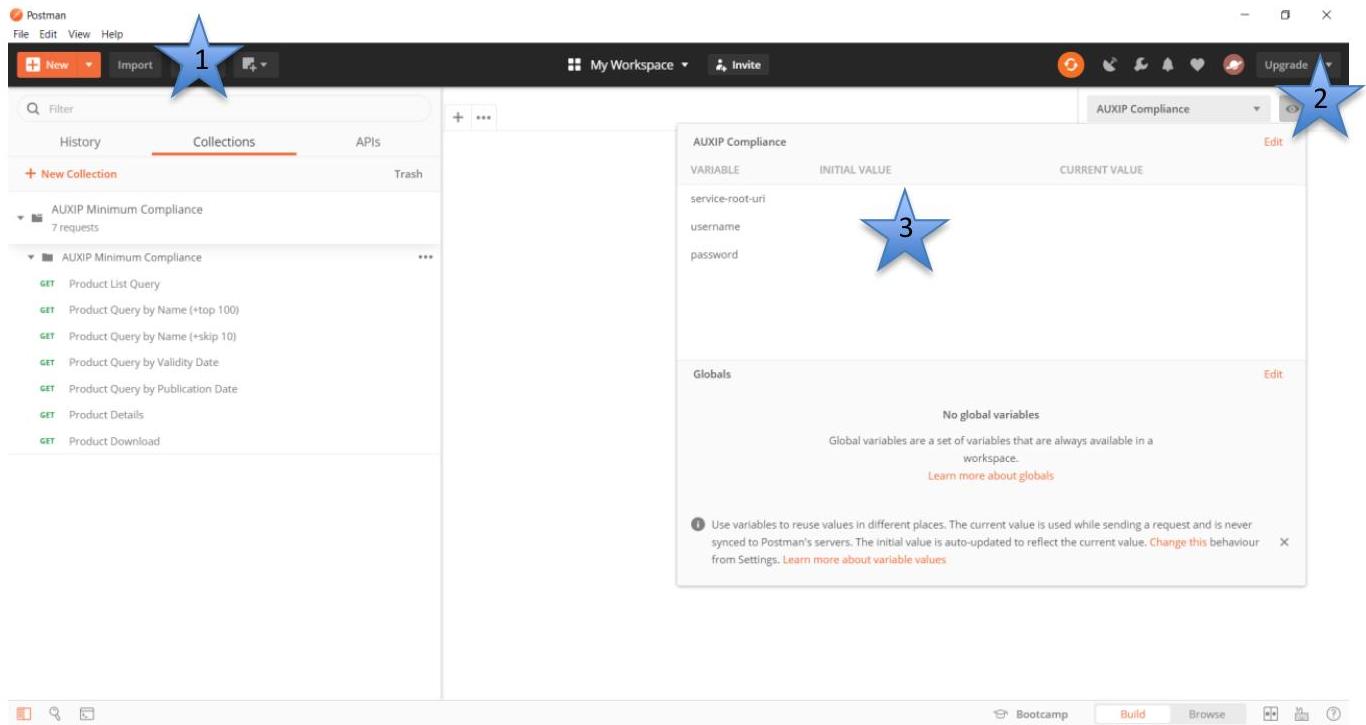
Session Listing Query
The first CADIP query issues a basic Session Query to the CADIP. The test is initiated by sending the request to the CADIP, using the environmental variables established, and success is indicated in the Test tab as pass or fail.
The tests performed on the Session Listing Query are formulated to verify the OData context of the response, the properties of the Session and to set the variables for one of the Files returned to be used in subsequent tests.
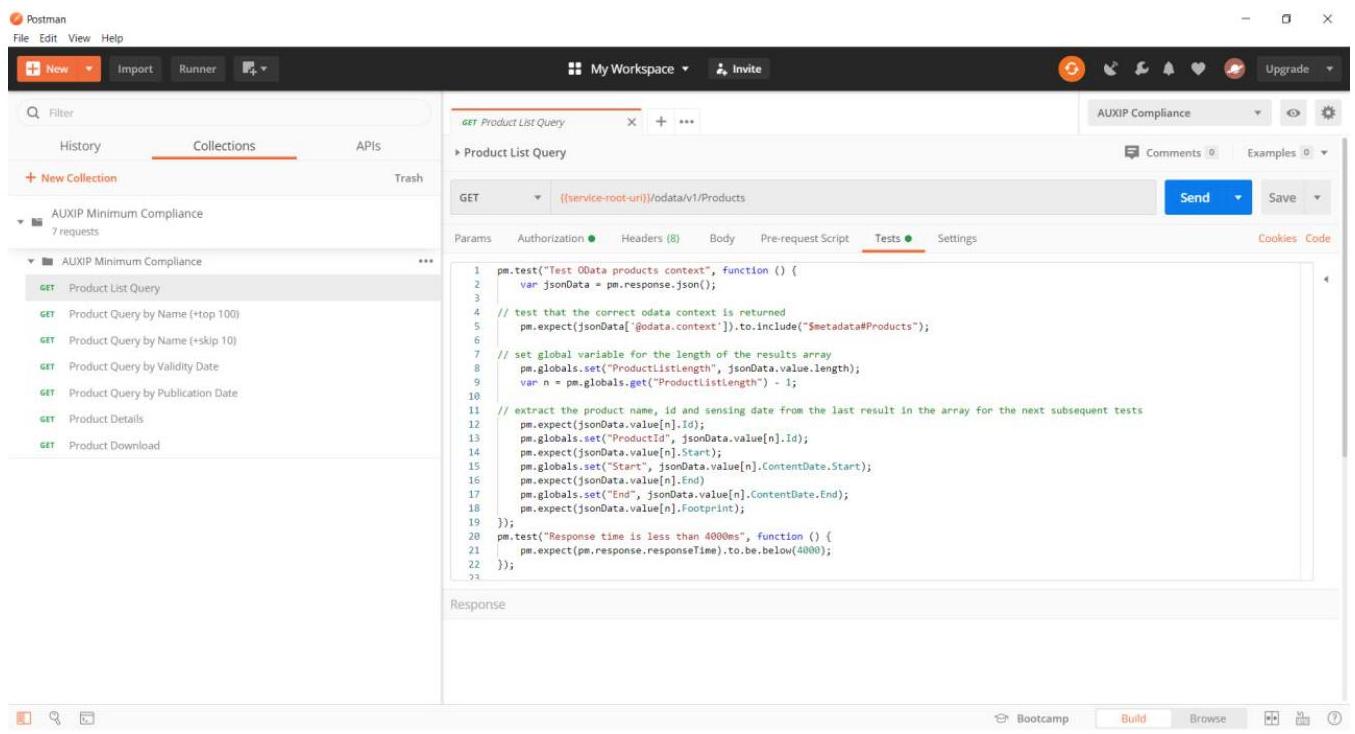
The query without any filter condition returns the ordered list of Sessions published on the CADIP.
APPENDIX C DATA SESSION FILE NAMING CONVENTION¶
The file naming convention to be used in the CADIP interface is reported below:
DCS_<nn>_<sessionid>_ch<x>_DSDB_<cnt>.raw
| Naming Element | Description | Format |
|---|---|---|
| <nn> | This is the X-band station unit ID | 2 digits (default is 00 if only one configuration is present or the parameter is not needed) |
| <SessionID> | This is the session ID | This is the session ID, identifying each acquisition 24 characters fixed string, containing digits, defined as follows: <SSSS><YYYY><MM><DD><hh><mm ><ss><aaaaaa> Where we have: <SSSS>: satellite: - “S1A_” - “S1B_” - “S1C_” - “S1D_” - “S2A_” - “S2B_” - “S2C_” - “S2D_” - “S3A_” - “S3B_” - “S3C_” - “S3D_” - “S5P_” - “S7A_” - “S7B_” - “S7C_” <YYYY>: 4 digits year of acquisition start <MM>: 2 digits month of acquisition start <DD>: 2 digits day of acquisition start <hh>: 2 digits hour of acquisition start <mm>: 2 digits minute of acquisition start <ss>: 2 digits second of acquisition start <aaaaaa>: 6 digits acquisition orbit |
| <x> | This is the channel. Allowed values are: - 1 - 2 - 3 - 4 | 1 digit. |
| <cnt> | This is the DSDB numbering | 5 digits always starting from 00001 in each session |
Table 5: – Files Naming Convention
APPENDIX DRAW DSDB DATA FILES¶
The raw binary data transferred from the generic X-band/Ka-Band Ground Station to the data delivery point is in the form of a collection of DSDB files of predetermined size and containing an integer number of CADUs (also including RS uncorrectable CADUs). This means that CADUs are not truncated by the segmentation process.
The idle frames generated by the satellite and present in the original stream of data at the input of the Demodulator are as well consolidated as all other data.
The DSDB size is the same for both channels and is configurable in range from 50 MB to 4 GB independently per Sentinel satellite, the size of 300 MB being currently considered as a reference.
APPENDIX E CADU ANNOTATIONS¶
Transfer Frame and CADUs annotations are appended to each packet respectively generated or acquired by the front-end system.
The ordering of PCD bytes appended to each Transfer Frame or CADU is shown below.
Earth Receive Time
This annotation captures the ground station reception time (UTC) of the CADU in 8 bytes.
The time stamp is based on a Modified Julian Day 2000 (MJD2000) with an epoch of: 01-JAN-2000 00:00:00.000000
In short the format contains:
2 byte days since epoch
4 byte milliseconds
2 byte microseconds
Layout:
| Byte | Bit | Description |
|---|---|---|
| 0 | 7 -0 | Day number (15 .. 8) |
| 1 | 7 -0 | Day number (7 .. 0) |
| 2 | 7 -3 | All zeros |
| 2 | 2 -0 | Milliseconds of day (26 .. 24) |
| 3 | 7 -0 | Milliseconds of day (23 .. 16) |
| 4 | 7 -0 | Milliseconds of day (15 .. 8) |
| 5 | 7 -0 | Milliseconds of day (7 .. 0) |
| 6 | 7 -2 | All zeros |
| 6 | 1 -0 | Microseconds of Milliseconds (9 .. 8) |
| 7 | 7 -0 | Microseconds of Milliseconds (7 .. 0) |
Table 6: Earth Receive Time Annotation Format
Relation to CCSDS Day Segmented Time Code (CDS)
This section describes the relation to CCSDS Day Segmented Day Code (CDS), as per CCSDS Blue Book 301.0-B-2, Time Code Formats
Preamble Field (P-Field):
The P-Field is implicit, i.e. it is not transmitted/part of the data stream.
| Byte | Value | Description |
|---|---|---|
| 1-3 | 7 -0 | Time code identification |
| 4 | 7 -0 | Agency-defined epoch (which is Jan 1st 2000) |
| 5 | 7 -3 | 16-bit day segment |
| 6-7 | 2 -0 | microsecond resolution |
Table 7: Time Field Format
Time Field (T-Field):
As specified in the «Layout» section above.
APPENDIX F RETRANSFER SCENARIO¶
In case of data retransfer initiated by the Acquisition Provider, a completely new session will be created for a re-transfer, not try to update the old one.
The SessionId is not the unique key describing the Session, instead we have the “Id” key (GUID = global unique id type)
So the scenario is as follows:
first Session is created
Id= 2b17b57d-fff4-4645-b539-91f305c27c69 SessionId= S1A_20170501121534062343 PublicationDate=2017-05-11T12:00:00.000Z Retransfer=False Etc.
The qualityInfo associated to that is reported via https://<;service-root-uri>/odata/v1/Sessions(2b17b57d-fff4-4645-b539-91f305c27c69)?$expand=QualityInfo
a second Session is created
Id= 6cd673c9-845e-4677-aebc-77afb77f9373 SessionId= S1A_20170501121534062343 PublicationDate=2017-05-11T12:15:30.1230Z Retransfer=true Etc.
The qualityInfo associated to that is separate and reported via https://<service-root-uri>/odata/v1/Sessions(6cd673c9-845e-4677-aebc-77afb77f9373)?$expand=QualityInfo